
IDJen
Known Participant
August 22, 2017
Answered

Table of Contents navigation not working after a certain slide

  • August 22, 2017
  • 1 reply
  • 837 views

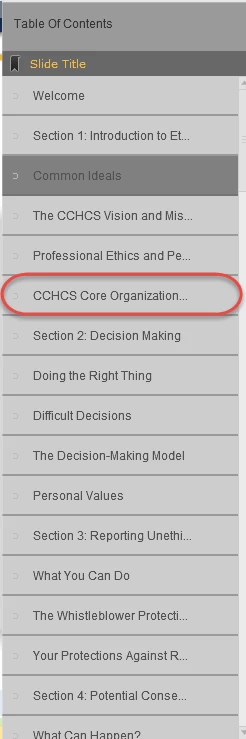
I have a Captivate 9 project where the TOC has been refreshed many times and yet you can't navigate past the slide circled below. Can't click on any titles or move anywhere past this slide.  I've compared the settings to other courses where this isn't an issue and can't see anything that would cause this issue.  Has anyone else had this problem? If so, how do I fix it?

Thanks!

Jen
This topic has been closed for replies.
Correct answer Lilybiri

That Required setting could be the cause of the problem. Can you set it back to 'Optional' (there are other ways to push the learner at answering all questions) and check that Backwards movement is allowed for Quiz?

1 reply

Lilybiri
Legend
August 22, 2017

Which version of 9?

What happens on that slide? Do you have a quiz in this project? I don't think you turned on Branch aware, nor have Pretest slides?

IDJen
IDJenAuthor
Known Participant
August 22, 2017

Hello...thanks for the quick response.  We are running version 9.0.2.437.  That particular slide is just text with shapes. 

The developer did use Quick Check questions that are after this slide.  Quiz settings are the user must answer all questions. Would that be the problem? If we make them regular slides with click boxes for responses will that make the user able to navigate throughout the course? Here is what the Quick Check slides look like:

Thanks again for the information!

Lilybiri
LilybiriCorrect answer
Legend
August 22, 2017

That Required setting could be the cause of the problem. Can you set it back to 'Optional' (there are other ways to push the learner at answering all questions) and check that Backwards movement is allowed for Quiz?