
Known Participant
October 25, 2017
Question

Table of Contents Tick/Check is not properply aligned

  • October 25, 2017
  • 2 replies
  • 1078 views

Hello guys

I was trying to figure out how I can fix this issue regarding of the Tick/Check in the TOC section.
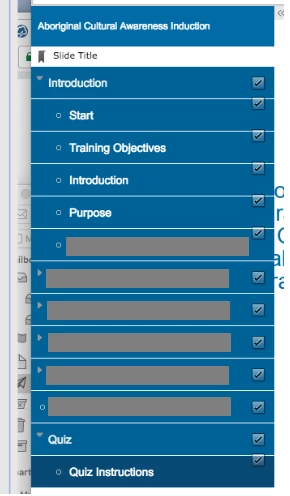
Is there any way to solve this problem? I badly need a help hehe

Thanks in advance

Cheers,

    This topic has been closed for replies.

    2 replies

    BenRogers
    Participant
    November 21, 2017

    The same problem was driving me crazy! It seems to be a bug with Captivate 9 HTML5 output. I've documented a workaround here: https://elearning.adobe.com/2017/11/fixing-alignment-of-toc-checkmarks/ 

    Hopefully this can help you out.

    en6geh77Author
    Known Participant
    November 21, 2017

    The link is not working :-)

    BenRogers
    Participant
    November 21, 2017

    en6geh77​ Can you try the link again? Maybe my post was still in review before.

    TLCMediaDesign​ The problem isn't with the indentation itself, it just happens to only affect indented topics. What's wrong is the vertical positioning of the "Status Flags" (checkmark icons) that mark completed/"visited" status. The icons should be vertically aligned with the text, but sometimes they're offset upwards. Take a look at the two images en6geh77 had posted:

    Row isn't grouped, icon shows proper vertical alignment:

    Row is grouped/indented, the checkmark is misaligned, offset upwards:

    It's a bug in the JavaScript method that calculates the topMargin attribute of each checkmark, and it can be fixed by making a minor change to the createVisited method in CPM.js (inside the published HTML5 content).

    RodWard
    Community Expert
    Community Expert
    October 25, 2017

    Do you have some slides grouped in the filmstrip view?  If so, ungroup them and refresh the TOC again.  You may find that then they all line up better then.

    en6geh77Author
    Known Participant
    October 26, 2017

    Hello sir, it's working but If I am going to ungroup them, how can I group the slides if they are part of the topic? like the Introduction above.

    RodWard
    Community Expert
    Community Expert
    October 26, 2017

    In the TOC settings (under Project > Skin Editor > TOC)  you can set slides to have a specific level and then format that level to look a certain way.