August 1, 2011
Answered

table widget does not display all text

  • August 1, 2011
  • 2 replies
  • 557 views

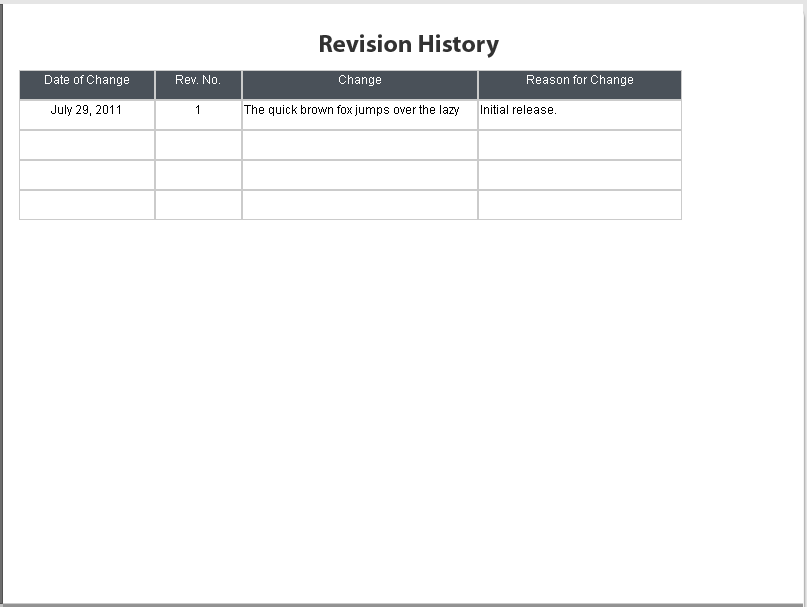
any ideas on how i can display all the text in the cells??  (the missing word below is "... dog.")
    This topic has been closed for replies.
    Correct answer Lilybiri

    Did you try to adjust the width in the widget properties? Normally you get a light-blue double arrow when hovering over the separation line between the columns.

    Lilybiri

    2 replies

    RodWard
    Community Expert
    Community Expert
    August 2, 2011

    If you want any hope of the Adobe developers picking up on your request to have this addressed, you need to fill out an enhancement request:

    https://www.adobe.com/cfusion/mmform/index.cfm?name=wishform&product=5

    Lilybiri
    LilybiriCorrect answer
    Legend
    August 1, 2011

    Did you try to adjust the width in the widget properties? Normally you get a light-blue double arrow when hovering over the separation line between the columns.

    Lilybiri

    August 1, 2011

    thanks for the quick response, Lieve.

    so it seems the table widget does not displayed wrapped text.  i'm forced to resize the column size to

    fit all my text as one row going across.  to the Adobe developers: perhaps you can address this limitation in some future release.