Nadya-volg-1983
Participant
July 18, 2016
Question

taking a test at one attempt

  • July 18, 2016
  • 1 reply
  • 431 views

The course consists of lectures and tests. The number of attempts in the test 1. If the test is less than 80 points, there is a button "to take a course again." Points are reset. Push the button, and the test does not have access. How to leave a number of attempts to test 1 and take the test again? Is that possible? Attempts should be 1

This topic has been closed for replies.

1 reply

Lilybiri
Legend
July 18, 2016

Thanks for posting in English, this makes it a bit easier.

For quizzes there are attempts on question level (which you show on the screenshot: 1 Attempt) and questions on quiz level (to be set in Quiz Preferences, Pass or Fail. The Retake button that you can have on the Score slide, needs at least 2 attempts on Quiz level. When the user clicks that Retake button, all answers are reset and also all Quizzing system variables, like the score (cpQuizInfoPointsscored), the percentage (cpInfoPercentage) etc.

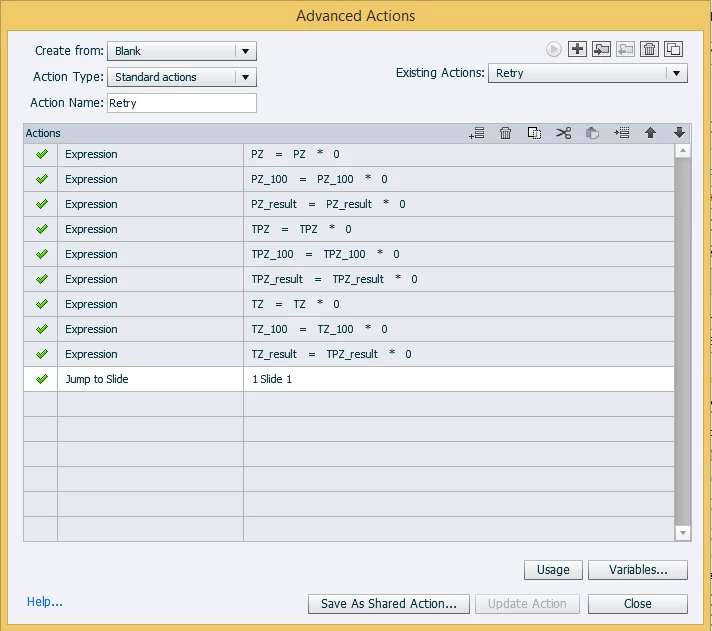
It looks like you tried to create an advanced action to be triggered by which button on which slide? You cannot change the quizzing system variables, they are read only. I see a lot of variables in that standard action, but have no idea what they mean, nor how they were populated.

If you want the user to get back to the first slide of the course after a first attempt on Quiz level, you'll need another approach. The easiest one is to put a scored object on that first slide (1 point), like a button. When the user clicks on the Retake button on the score slide, he will be taken to the first slide (because there is a scored object) and all scores are reset to 0.

It helps if you tell which version you use. Is it Captivate 9?

Nadya-volg-1983
Participant
July 18, 2016

it Captivate 9. "Next" button in the lecture does not translate into a slide with the test. there is no translation on the slide and all. Existing variables help to count points, all of them well.

Lilybiri
Legend
July 18, 2016

I understand this is difficult in English, but you are using the English version of Captivate.

Your last answer is incomprehensible, because of the verb 'translate' which I don't understand.

You do not need user variables, you have to use the quizzing system variables. Even if you put the user variables to 0 (would have been easier with the command Assign,  like "Assign PZ with 0" for the first command instead of that Expression), that will not reset the values of the Quizzing variables at all! Those variable are the only ones that can be transferred to a Learning Management System. You can download the list with all variables from this blog post:

System variables in Captivate 8/9 - Captivate blog

The only way to give the use a new attempt, is to have multiple attempts on Quiz level, and show a Retake button on the Score slide.

Check your version number: is it 9.0.1.320?