
Known Participant
April 25, 2017
Answered

TEB Variable

  • April 25, 2017
  • 1 reply
  • 933 views

I have a variable number that is assigned from a TEB. However, if that TEB variable is changed, my Adv. Action to show/hide a smart object is not functioning as it should.

Here is the AA:

If any of the conditions are true:

vProd greater or equal to 98

vProd lesser or equal to 120

Action:

Show variYes

Hide variNo

ELSE:

Show variNo

Hide variYes

If I enter 100, the variYes should show. It does not. If I type in 75, variNo should show. It does. After the first time entering a number, if I enter a new number, the variable changes but, neither variYes or variNo show/hides. The variable is changing as intended but the visibility of the smart objects (variYes/variNo) are not showing properly.
This topic has been closed for replies.
Correct answer RodWard

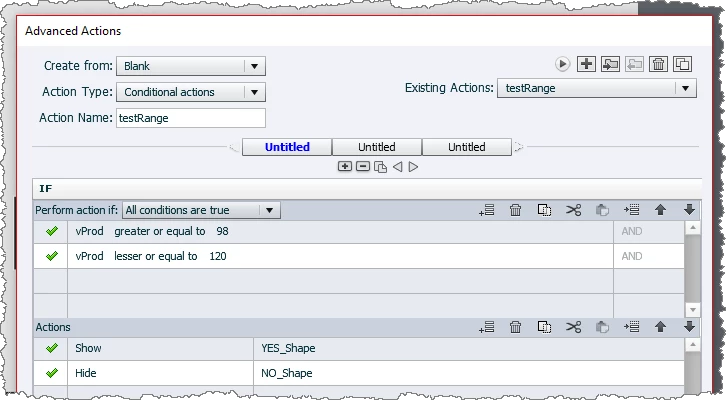
I still don't think you have set up the conditions correctly.  When I tested it mine looked like this:

TEBs always pause the timeline somewhere. (I think Adobe feels there's not much point showing a TEB unless you intend allowing the user enough time to enter something in it.)

If you use the Smart Shape button as I suggest, you can use its own pause behavior to make sure the slide does not advance.

1 reply

RodWard
Community Expert
Community Expert
April 25, 2017

If I understand you correctly, you want the variYes object to display if a number between 98 to 120 is entered into the TEB, correct?

Try changing the way the Condition is evaluated from "IF ANY" to "IF ALL" conditions are TRUE. Make sure there is an AND beside each of the condition line statements. That way it will be evaluating all numbers within that 98 to 120 range.

With TEBs you need to remember that they have an Active and an Inactive side, separated by their Pause Point on the timeline.  You can only use their Success event to execute an Action on the Active side of their Pause Point on the timeline.  So after you have clicked the Submit button for the TEB, which then executes the Success action, your TEB timeline is now in the Inactive side of the Pause Point and no further action will be executed unless you get back over to the Active side again.

There are a couple of ways to achieve this:

One way is to add an action line to the Conditional Action AFTER the HIDE/SHOW actions that rewinds the timeline playhead back the required number of frames until it would be again in front of the Pause Point.

However, my personal preference is to just get rid of the Submit button from the TEB and add another Smart Shape button to the slide instead, label it as Submit, and have that button execute the Conditional Action that evaluates the current value of the TEB's associated variable (where the entered value is stored).  If you set the Smart Shape button to Unlimited Attempts, then the user can happily enter values into the TEB forever and each time they click the Smart Shape button it will execute the Conditional Action to evaluate the variable and show or hide the relevant object.

Many Captivate users don't realise that anything you type into a TEB is immediately written to its associated variable.  It doesn't need the normally present Submit button for this to happen.  So you can get rid of the default button and use another button to execute the action that evaluates the variable value as often as you want.

Known Participant
April 25, 2017

Thanks. The pause makes sense. I tried the variable conditions both ways and got the same results. I'll try the other method of getting rid of the submit button and using a Smart Shape instead. I noticed that the variable was changing immediately, which is something I want. Is it possible to remove the pause from the submit button? I have a custom Next button that pauses the slide anyway and I want the user to be able to change the variable as much as they want before going to the next slide.

RodWard
Community Expert
RodWardCommunity ExpertCorrect answer
Community Expert
April 25, 2017

I still don't think you have set up the conditions correctly.  When I tested it mine looked like this:

TEBs always pause the timeline somewhere. (I think Adobe feels there's not much point showing a TEB unless you intend allowing the user enough time to enter something in it.)

If you use the Smart Shape button as I suggest, you can use its own pause behavior to make sure the slide does not advance.