March 1, 2012
Answered

Text caption "call outs" not measured same way

  • March 1, 2012
  • 1 reply
  • 701 views

Captivate v5.5

When creating call out text captions I like them to be the same size when possible - regardless if the call out is pointing up (left or right) or down (left or right).

Having created and sized a call out pointing down left - I then create a new call out pointing up left.

In order to resize the new call out I click the down left call out first, then the new call out and then click the "Resize to the same size" icon on the Align Toolbar and the result is as follows:
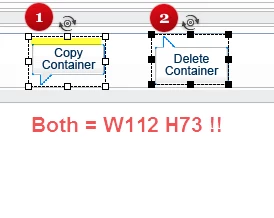
Whilst the Properties of both call outs are, according to Captivate the same (W112 H73), the two call outs are in fact different sizes - (1) is not as high as (2).

Seems the height of (1)  includes some blank space at the top - highlighted in yellow.

Is this a settings issue I can change or what ?

Noel

    This topic has been closed for replies.
    Correct answer Lilybiri

    I discovered a big difference in the captions BMP's: blank space is different at top/bottom between the two callouts you showed. Look at the screenshot (from PS): the left caption has a space of 11px at the top and 3px at the bottom, the right one has 2 px at top and one at the bottom. It seems not to be possible to modify the present default Adobe captions, which I tried but the old ones always show up. Did you change your Preferences a lot? Perhaps deleting the Preferences folder will allow to adapt those captions, but I'm hesitant because I have been changing a lot of Preferences.

    Possible is certainly to create your own custom text captions (you'll need all 5) as described in the Help. In that case you can even choose the exact corporate blue color for the stroke of the caption.

    Lilybiri

    1 reply

    Lilybiri
    Legend
    March 1, 2012

    Good catch, Noel. I never use that type of caption (Adobe Blue?) and just now checked them: indeed the caption 1 has empty space in the bounding box. Resizing will always resize the surrounding bounding box for all kind of objects. You'll see also the coordinates of the top left corner and the width/height of that box in the Transform accordion. Changing size/moving (with shortcuts) is always acting on that bounding box.


    This phenomenon seems only to happen with the Adobe Red, Blue, Yellow,..... captions, not with the other ones. Will have a look at the definitions (BMP, FCM) in the Gallery/Captions. It must be annoying...

    Lilybiri

    March 1, 2012

    Hi Lilybiri,

    Thanks for helping on this one. Wait to hear outcome with interest.

    I use the Adobe Blue call outs as the blue (#0080FF) is not too far off one of the two corporate blues used by my company.

    Noel

    Lilybiri
    LilybiriCorrect answer
    Legend
    March 1, 2012

    I discovered a big difference in the captions BMP's: blank space is different at top/bottom between the two callouts you showed. Look at the screenshot (from PS): the left caption has a space of 11px at the top and 3px at the bottom, the right one has 2 px at top and one at the bottom. It seems not to be possible to modify the present default Adobe captions, which I tried but the old ones always show up. Did you change your Preferences a lot? Perhaps deleting the Preferences folder will allow to adapt those captions, but I'm hesitant because I have been changing a lot of Preferences.

    Possible is certainly to create your own custom text captions (you'll need all 5) as described in the Help. In that case you can even choose the exact corporate blue color for the stroke of the caption.

    Lilybiri