
margaritam62748980
Participant
September 15, 2016
Answered

text effects not available on captivate 9

  • September 15, 2016
  • 2 replies
  • 706 views

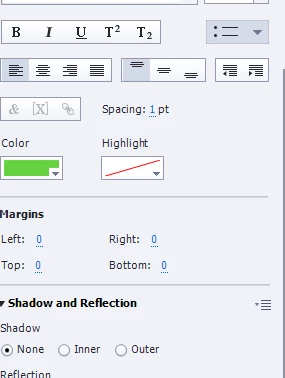
Hi. can someone explain to me why my version of captivate 9 64 does not have the text effects option? I am watching a tutorial on Lynda. the author shows how to use the effects on a button but on mine its missing! It;s supposed to be next to the Highlight. When you are in text mode in the tutorial it disappears but once you hit escaped and see the handles the text effects should be available as she says. i see nothing! Any advise?
This topic has been closed for replies.
Correct answer Captiv8r

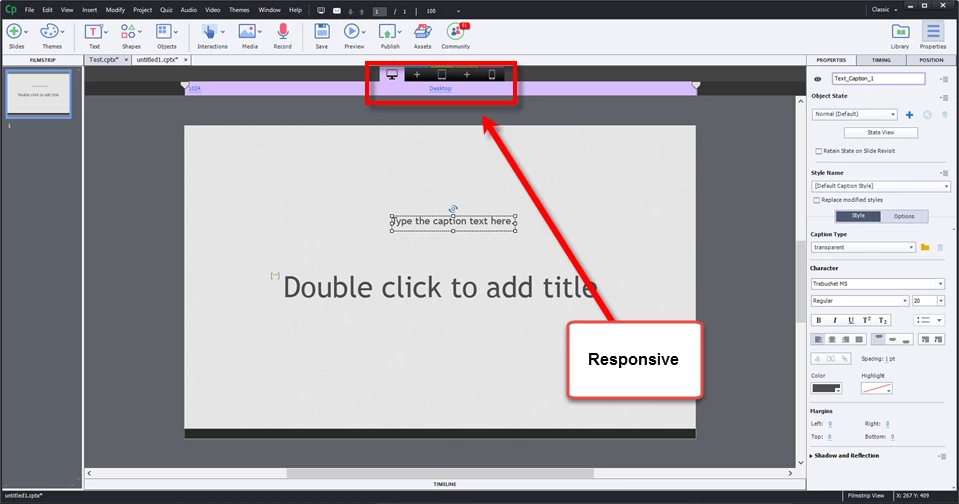
It could also be related to the project type. If you have a Responsive project with the sizes at the top of the editor, I don't believe the effects are available in those types of projects.

Cheers... Rick

2 replies

margaritam62748980
Participant
September 15, 2016

thank you. this seems to be the reason!

Captiv8r
Legend
September 15, 2016

Hi there

Text Captions have two modes. Text edit mode, where you edit the text. And the second mode where you are able to change the position. Try clicking away from the caption, then click once on it and you should see the Text Effects option.

Cheers... Rick

Captiv8r
Captiv8rCorrect answer
Legend
September 15, 2016

It could also be related to the project type. If you have a Responsive project with the sizes at the top of the editor, I don't believe the effects are available in those types of projects.

Cheers... Rick

Lilybiri
Legend
September 15, 2016

Indeed, Rick, responsive projects do not support Text Effects, nor Text Animations. I understand the reason for the Text Animations (Flash based), and probably the different font sizes in the breakpoint views make it difficult to apply the effects.