


Inspiring
September 15, 2021
Question

Text Elements not visible in all viewports

  • September 15, 2021
  • 1 reply
  • 341 views

Hello,

I'm working on a project that's having an odd issue. On some of my slides, the title is missing (i.e. not visible) in the Desktop viewport, but visible in every other. This is only happening on a few slides. Should I just replace them?


Desktop

Mobile
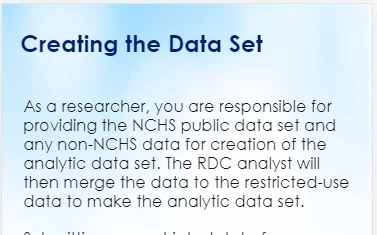
Tablet Portrait
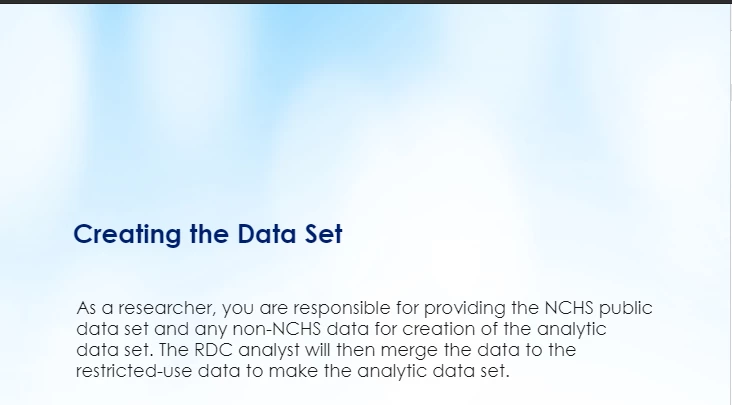
 

    This topic has been closed for replies.

    1 reply

    Lilybiri
    Legend
    September 16, 2021

    Can you please mention the exact version you are using and the OS?

    Can you confirm that you do use the workflow 'Breakpoint Views' with only 3 breakpoints?

    Did you create the theme used for this project? For the most recent versions of Captivate there are no themes anymore for the Breakpoint views workflow. They only offer themes for non-responsive projects and Fluid Boxes responsive projects.

    Is the Title text based on a placeholder on the master slide or not?

    Kenny5FB6Author
    Inspiring
    September 16, 2021

    I'm using Captivate 2019; my OS is Windows 10.

    I am using Breakpoint Views with 4 breakpoints: Desktop; Tablet Portrait; Custom Mobile; and Mobile Portrait.

    I did not create the template for this project. It's from Faster Course, but I've used this template many times and never before encountered the issue before.

    The title text is based on a placeholder on the master slide. 


    (An aside, Lilybiri: your tutorials have been a godsend. They've been very helpful over the years.)

    Lilybiri
    Legend
    September 16, 2021

    Thanks for your comment... thought that only YouTube was used now?


    It has been a while since I used Breakpoint views and I have never used a 'template' (they do not offer cptl but cptx files AFAIK) from Faster Course. Do you know for which version it has been created? 

    Can you please be more specific about the version number, there have been many releases under the common number CP2019. For Windows the most recent version is 11.5.5.553. You'll find it under Help, About Captivate.

    The desktop view is the one that is the first to be developed and the other Breakpoint views inherit from that view. Did you check the Position Propertiess panel for that placeholder?  

    Is this happening in Preview (F11 for HTML preview in Browser) and after publishing?