


Known Participant
October 7, 2021
Answered

Text Entry Box advanced action issue

  • October 7, 2021
  • 2 replies
  • 250 views

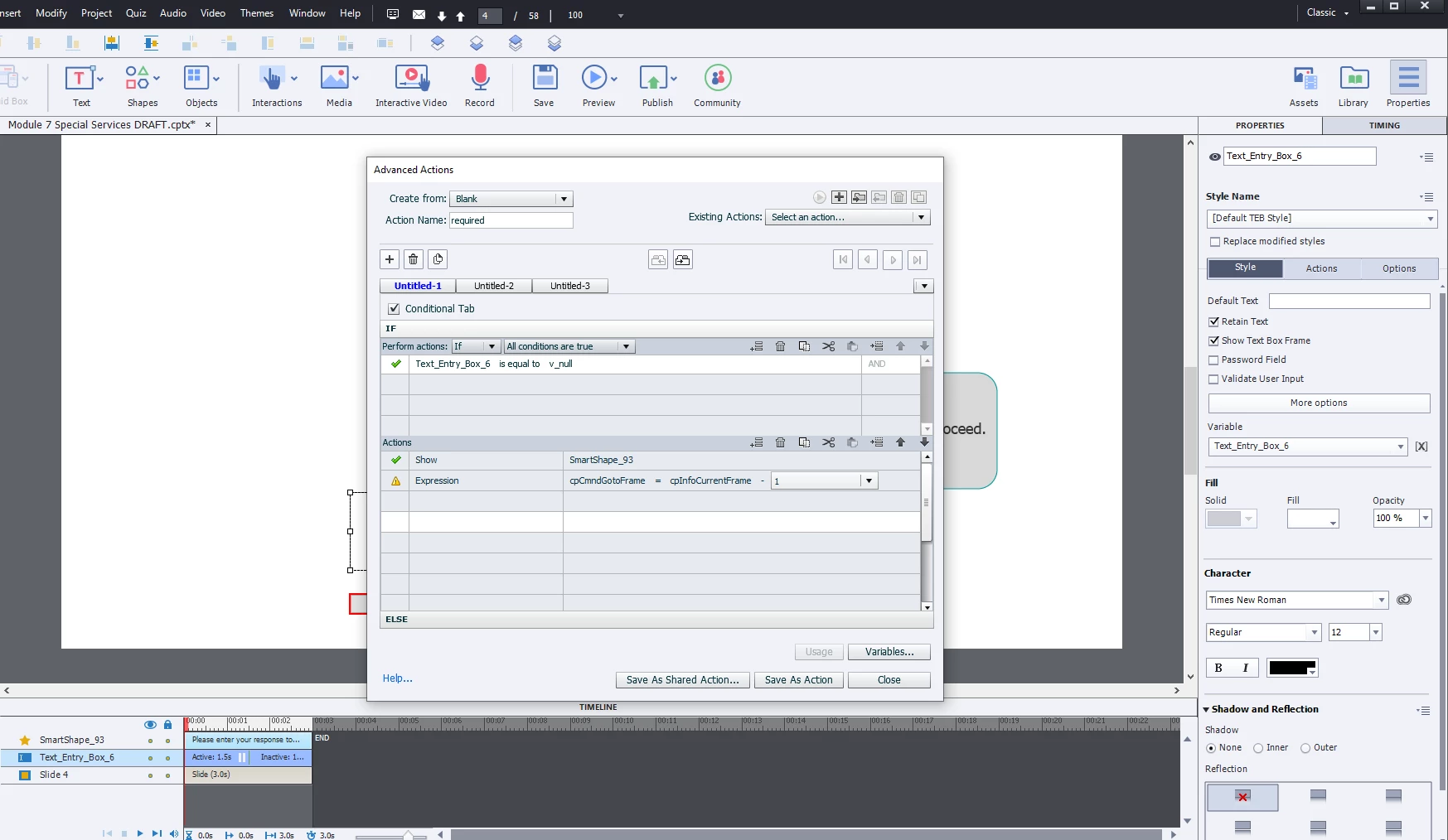
Hi I have a text entry box on slide 3, I am using the adobe captivate guide to add advanced actions to force the user to enter a response into the box. However, it is saying my script is incomplete. Anyone see my error? Is it the "1"?
 

    This topic has been closed for replies.
    Correct answer E-Learning Guy

    Further to Lilybiri's response, I'm wondering if you accidentally selected "variable" from the dropdown instead of "literal" and entered 1, as Captivate wouldn't recognize that as a variable unless you actually created a variable called "1."

    2 replies

    E-Learning GuyCorrect answer
    Inspiring
    October 7, 2021

    Further to Lilybiri's response, I'm wondering if you accidentally selected "variable" from the dropdown instead of "literal" and entered 1, as Captivate wouldn't recognize that as a variable unless you actually created a variable called "1."

    SlimahIDAuthor
    Known Participant
    October 7, 2021

    Yes, unkowningly, I selected "variable", but you're right there is no variable titled "1" so I had to change it to literal so it would know I mean the number one. Now it accepted the script.


    To back up, I created this TEB and script on a blank slide, am I to now copy and paste it on the previous slide which is where I want the user to input the information into the TEB? Or no leave it here and the action will execute?

    Lilybiri
    Legend
    October 7, 2021

    Use the Enter key to confirm the literal 1 as entry. It is similar to the fields in an Excel spreadsheet. As long as the exclamation mark has not been replaced by a green checkmark, the command is considered incomplete.

    SlimahIDAuthor
    Known Participant
    October 7, 2021

    Thanks @Lilybiri I did press enter, but now I see from @E-Learning Guy that I did choose variable from the drop down list instead of choosing literal. Once I changed it to literal the script was complete.