Anonomatos
Participant
February 19, 2015
Answered

Text entry box as mandatory field

  • February 19, 2015
  • 1 reply
  • 1056 views

Dear reader,

I'm finishing up an E-Learning course in Adobe Captivate 8. All is going well.

However, to apply for accreditation of the course, it should be impossible to submit an empty text entry box. I've read on this Forum and elsewhere and found lots of possibilities with advances actions and variables. I do understand the basics of applying variables and setting up advanced actions, but I'm not able to apply this knowledge and get it working.

Is there an (easy) answer? A step-by-step instruction to make it mandatory for users to enter something in a text entry box?

Hope some of you can help!

This topic has been closed for replies.
Correct answer Lilybiri

Ah, thanks!

I've made "tx_warning" (renamed it now) invisible now. And made the "Next" button ("Volgende" in Dutch) appear after 1.5s. The advanced ELSE action is set to continue. It looks like it is sort of working now.

- If I enter the slide, type something, then press "Submit" it continues.

- If I don't enter something, then press "Submit" the "tx_warning" message appears.

However, once I pressed the "Submit" button once when empty, it doesn't do anything anymore when I press it again.

I've added the screenshots. Anything unusual that can explain it doesn't work after pressing the "Submit" button once?
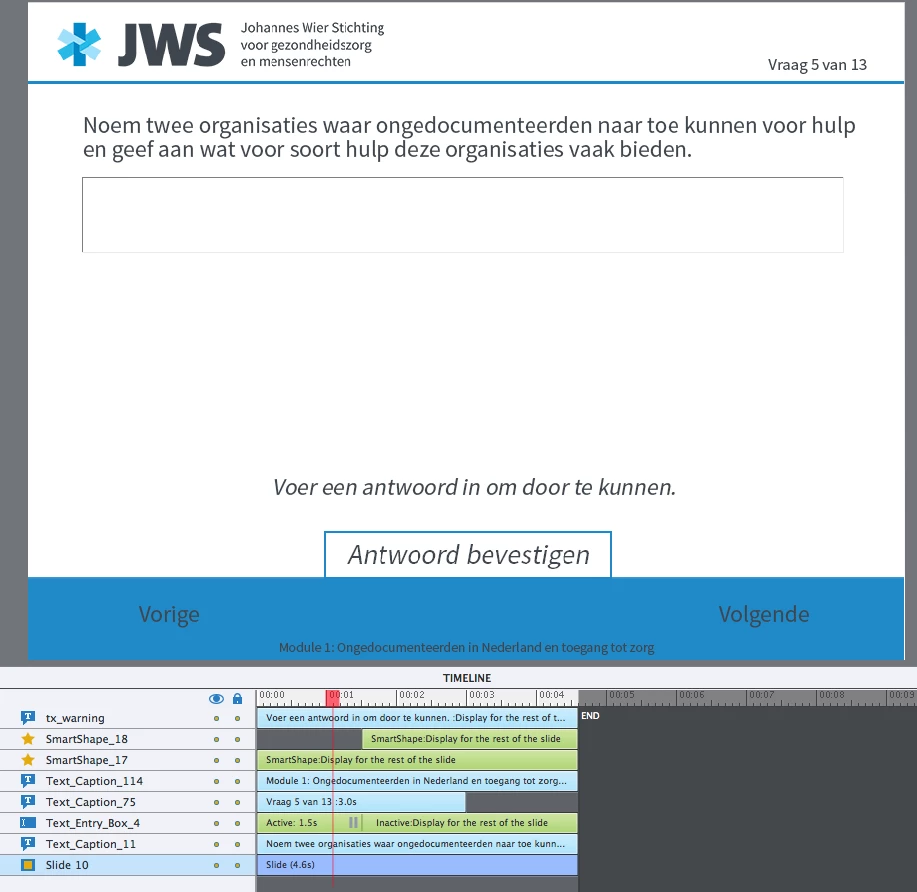
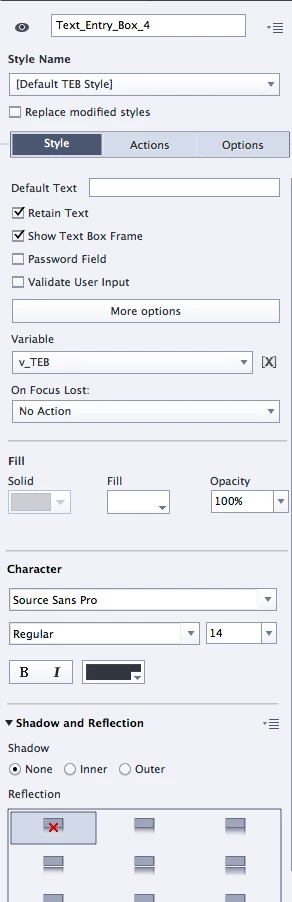
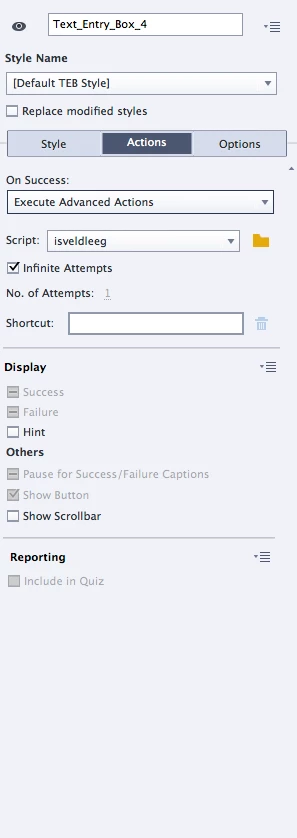
Het kan ook in het Nederlands natuurlijk.  Is de Submit button waar je 'Antwoord bevestigen' hebt? Die pauzeert op 1.5secs

Je zal normaal de knop 'Volgende' nooit zien, en hebt die ook niet nodig, want de frames na 1.5secs zullen nooit 'bezocht' worden.

OK, vergat dat er wel een en ander veranderde sinds dat oud artikel. Ik heb het eventjes getest, en met deze actie zou het moeten lukken. Als je geen audio hebt op die dia, is het helemaal niet nodig om die zo lang te maken, de normale duur van 3 secs is zeker genoeg.
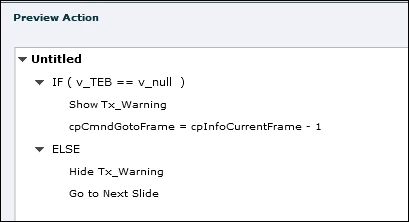
De Expression (dat is wat je moet kiezen in de afrollijst als commando) na Show (met cpCmndGotoFrame) zet de 'playhead' één frame terug zodat je opnieuw voor de pauze van de TEB komt en die opnieuw kan gebruiken. Als perfectioniste heb ik ook Hide ... toegevoegd in Else, indien de user ooit zou terugkeren naar die dia, dan is die waarschuwende tekst weer verdwenen.

1 reply

Lilybiri
Legend
February 19, 2015

Did you read this one: Where is Null? - Captivate blog

Because Captivate doesn't make a difference between a string and a number you have to create an empty variable v_null.

The TEB has an associated variable, will label it v_TEB (is not the generic name). When the user clicks on the Submit button, the Success action is triggered. You need to Execute Advanced Action for this event, and it will be something like:

IF v_TEB is equal to v_null

   Show  tx_warning     where tx_warning is a text container that was invisible

ELSE

   ......                           what has to be done when the TEB has something in it

Anonomatos
Participant
February 19, 2015

I did read the "Where is Null?" article and tried some of the steps. Still no luck.

What I've done:

1. Create variable "v_null" and left the description and value fields empty.

2. Create variable "v_TEB" and left the description and value fields empty.

3. Associate the TEB with the "v_TEB" variable.

4. Create conditional action as you described. The ELSE is set as "Go to next slide".

5. Set up a Text_Caption_159 (which I used instead of "tx_warning") which is hidden (I see a red cross in the timeline).

6. Set the "On success" in the properties of the TEB to execute the advanced action.

"Enter", "Exit", "On focus lost" are all set to no action. Number of attempts is set to infinite.

What happens is this: the "Text_Caption_159" is visible all the time and doesn't change if I enter something or press "Submit". Also, when pressing "Submit" the "Go to next slide" is not triggered.

What am I missing?

Lilybiri
Legend
February 19, 2015

A red cross in the timeline is not 'invisible' when previewing or publishing, but only for edit reasons to make the stage less crowded.

To make an object really invisible you have to click the eye icon, top left of the Properties panel of the Text Caption. This is in CP8 the equivalent of unchecking Visible in Output for previous versions. Sorry, but I cannot rewrite almost 100 articles because the UI changed again.

If it is still not working, post a screenshot of the Timeline and of the TEB properties.