Participant
May 30, 2015
Question

Text Entry Box: Cannot see all properties

  • May 30, 2015
  • 2 replies
  • 306 views

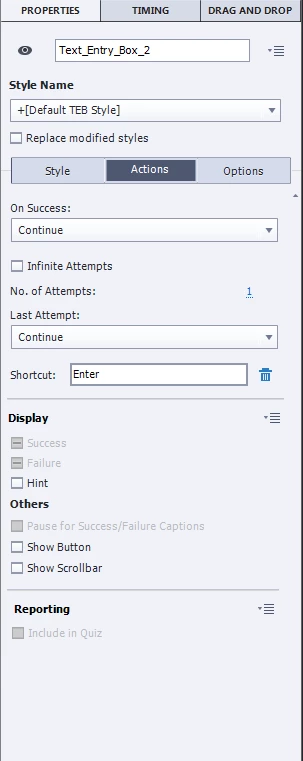
I am unable to see all the properties of my text entry boxes. For example, I cannot find "General". See the screen shot below.

    This topic has been closed for replies.

    2 replies

    Lilybiri
    Legend
    May 31, 2015

    I suspect you are referring to the panels that existed in previous versions, where the Properties panel had different labeled parts? They disappeared in CP8, and as KurryKid points out, your screenshot with the flat design is telling that you use CP8. Some of those parts have now been replaced by tabs, and the former Timing part has been taken out in a different panel "Timing Properties". If you are looking for most settings of the former 'General' part, you have to click on the tab 'Style', for the moment you are on the tab 'Actions'. Time and Transition however are now in the new 'Timing Properties' panel. If you don't see it, use Windows menu to open it in the right docking station. Workspaces are gone if you use newbie UI.

    Participant
    June 3, 2015

    Thank you!

    Lilybiri
    Legend
    June 3, 2015

    You're welcome. On the whole I'm not impressed by the quality of the Captivate tutorials on Lynda.com, compared with their usual level for other applications. This is also based on the many, many questions I get by all channels from users who took those tutorials and are still totally lost. Maybe my teacher's past, and my personal very structured way of training is distorting my opinion.

    Inspiring
    May 30, 2015

    What version of Captivate are you using? I am using v8 and it looks exactly like your settings.

    Participant
    June 3, 2015

    V 8.0

    I see Re: Wow! Thanks to Lilybiri's blog I have learnt a whole new way of using CP! response.

    I was viewing a training in Lynda.com and I couldn't follow them along with respect to properties.