Stagprime2687219
Legend
February 26, 2018
Answered

Text Entry Box Struggle

  • February 26, 2018
  • 1 reply
  • 413 views

OK - I have two text entry boxes on my screen - nothing really special about them.

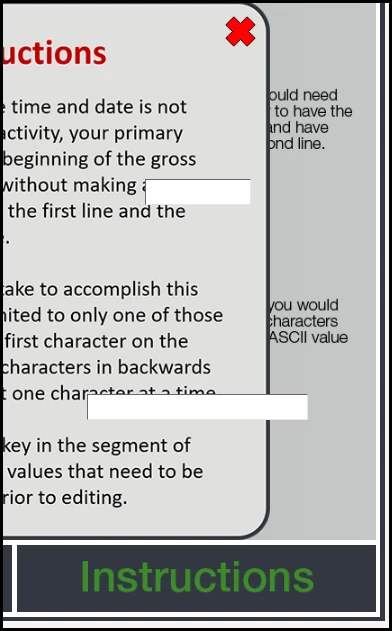
I also have a button at the bottom of the screen for the learner to click on for some instructions.

If they open the instructions, a window pops up with its own close 'X'.

The problem is that no matter how I layer the items or what order I create them in, the text entry boxes will not layer underneath the instructions window.

When the window is up, I cannot type in the boxes or give them focus but it doesn't want to go away.

Thoughts?
This topic has been closed for replies.
Correct answer Lilybiri

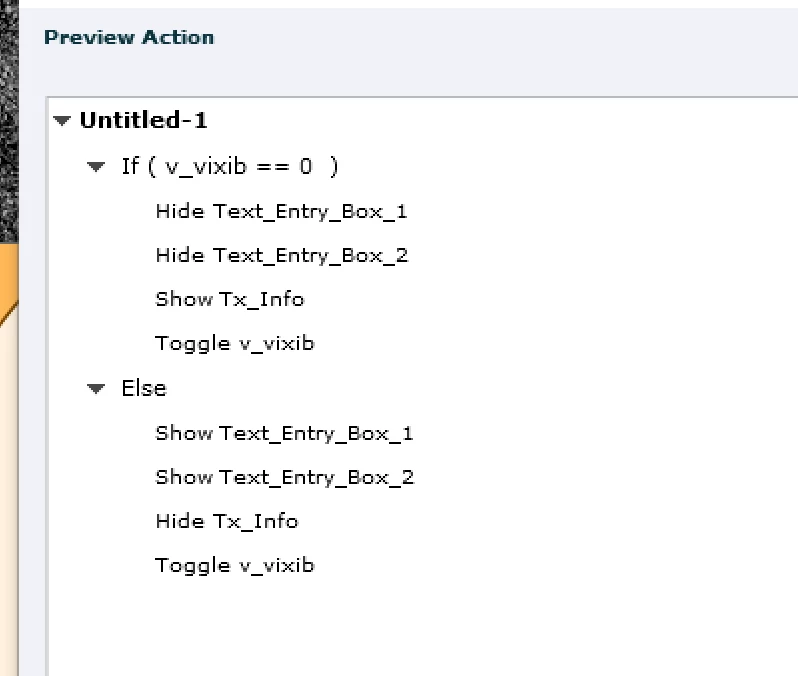
I would add commands to hide the TEB's and to show them. Sorry, this screenshot is for a toggle button, but you can have a similar result with two actionsi nstead of a conditional: use the THEN part for the info button, and the ELSE part for the close button.

1 reply

Stagprime2687219
Legend
February 26, 2018

Oh yeah, Captivate 9.0.2.437

Lilybiri
LilybiriCorrect answer
Legend
February 26, 2018

I would add commands to hide the TEB's and to show them. Sorry, this screenshot is for a toggle button, but you can have a similar result with two actionsi nstead of a conditional: use the THEN part for the info button, and the ELSE part for the close button.

Stagprime2687219
Legend
February 26, 2018

Yeah, that is pretty much what I ended up doing.

Two quick lines of code on each button worked fine.

cp.hide("scriptBox");

cp.hide("asciiBox");

I didn't think I should have to do that but I am OK with the solution.

Thanks.