July 15, 2011
Question

Text Entry Boxes not waiting

  • July 15, 2011
  • 1 reply
  • 306 views

Hi

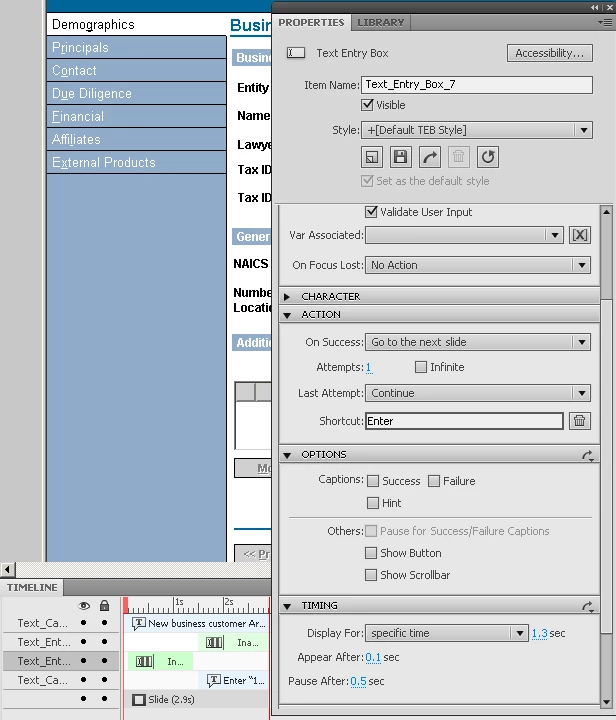
In Captivate 5 I've got a sim slide with two text entry boxes...   The first one scores a point and the second one lets the user try it once more without a score...  The boxes are set on the timeline spaced apart with the first box object before the second one; both have the same properties (see screen shot)...  it works fine in the 'preview' but when I publish to .swf and run it the slide basically runs as if there were no pauses...   Can you think what might cause this?..  Thanks for your help...
    This topic has been closed for replies.

    1 reply

    JeremySunk
    Participant
    July 19, 2011

    If they are both setup the same way then, that's the problem. If both of them are saying to go to the next slide then the first one will take you to the next slide before the second one loads. Change the first text entry box to "CONTINUE" and see if that will help you. Also make sure you have a Pause for Success/Fail captions, even if you don't have them..

    July 19, 2011

    hi

    Thanks for the response...   My issue is not what the entry box does after an event occurs (ie, going to the next page or continuing)...   Rather, when the slide plays after compiling to .swf, the timeline won't pause for an entry by the user...  It runs right through all the objects (text entry box, text message, etc.) and goes to the next slide...   The odd thing is that this will happen for several slides in a row and then suddenly revert to pausing when it should...   I will try your suggestion to have a pause for success/fail captions (even though I don't use any in the file)...

    Thanks!

    JeremySunk
    Participant
    July 19, 2011

    Let me know how the pause for success works.. If not the other trick would be to add a click box and have the settings  for the shortcut: ENTER and then check the box for pause for user click.. This way the user can press enter instead of clicking and the .swf will pause and start after enter is pressed.