
jackb93304284
Known Participant
February 6, 2019
Answered

Text Entry works within Captivate but not SCORM Cloud

  • February 6, 2019
  • 23 replies
  • 932 views

Hi folks,

If anyone could shed some light on this I would appreciate it.

Fairly simple, I have some text entry boxes where you would need to put in a specific word to move on. This works within Captivate but as I preview within the SCORM cloud it doesn't work. Not too sure how it can work in one and not the other.
    This topic is closed to new replies. Start a new post to keep the conversation going.
    Correct answer Lilybiri

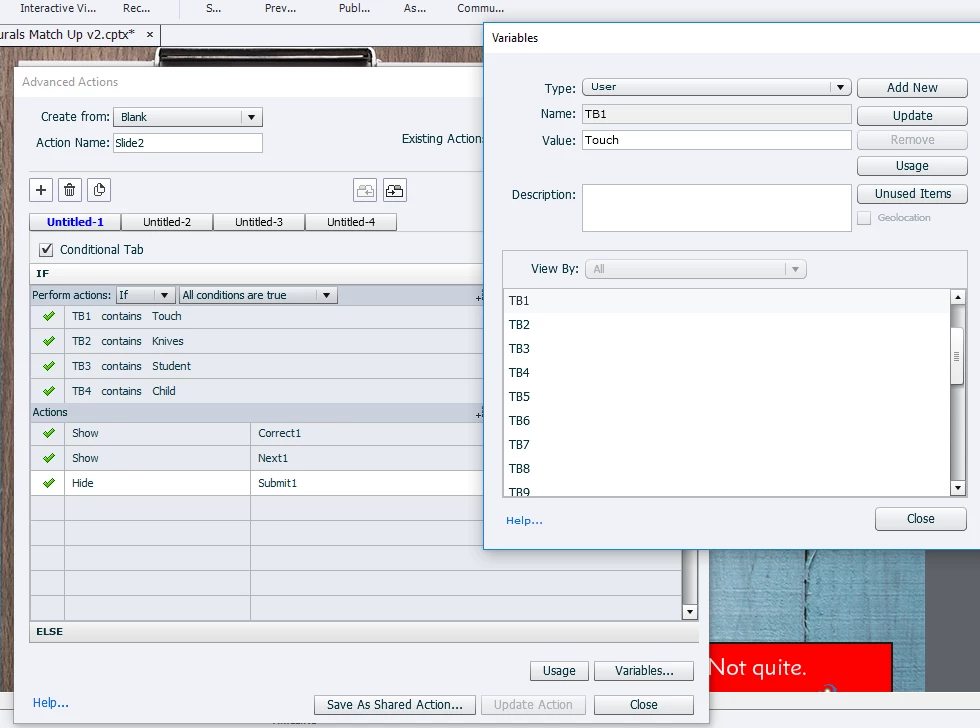
    I am working with multiple TEBs. Sorry for the confusion, I did mention in my last reply that the screenshot attached was just a simplified example of the issue I have and it wasn't my full project. Attached now is a screenshot of my full project. I can confirm if I change 'Touch' to just lowercase it works but I need it as a Capital. I have also tested your suggestion just to see if it works on using the Validation feature for just one TEB, again it works with lowercase touch and not with a Capital T.

    Thanks.


    Just try once with 'is equal to' instead of the less strict 'contains'. However it looks like Touch with a capital is considered to be a keyword in SCORM Cloud. You didin't get a warning in Captivate.

    23 replies

    Lilybiri
    Legend
    February 6, 2019

    Please, give some more details: which version do you use? What is the set up for the Text Entry Box: validated, number of attempts, Actions on Success/Last Attempt?

    When you say 'works within Captivate' how did you test? If you want HTML5 output you need to test with Preview HTML in Browser (F11) in case of a non-responsive project (another missing important detail)? All other previews are SWF-based.

    jackb93304284
    Known Participant
    February 6, 2019

    Hi,

    I am using Captive 2019. The set up is multiple text entry boxes and I have created by own submit button, each text entry box will have a variable associated with it which would be a certain word. Unlimited attempts. Actions on success would just show if they got it right or wrong.

    And when I say it works within Captivate, if I preview Project it works, HTML5 in Browser works, SWF in Browser works. It does not work for Preview in SCORM Cloud which is what I need.

    Lilybiri
    Legend
    February 6, 2019

    Check version number, should be 11.0.1.266.

    Did you set up Reporting? SCORM Cloud requires a project that has been published as SCO.