kellies50617532
Inspiring
March 25, 2019
Answered

Text Fade In Not Working

  • March 25, 2019
  • 1 reply
  • 398 views

Hi everyone,

I recently updated to Captivate 2019 and am still learning.

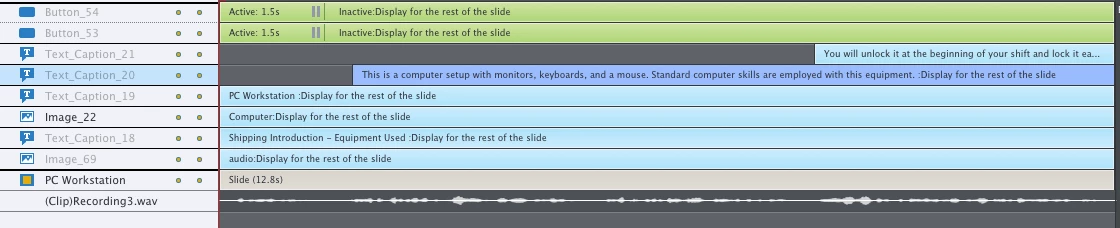
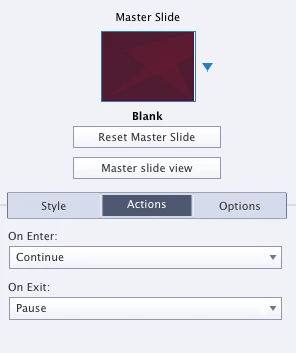
Recently, I had to add audio to my project and timed the text to fade in when the audio reached that point. The problem is that the text does not fade in on previews or in the LMS. I have the slide to Continue and Pause for on enter and on exit respectively.

The fade in does not occur when it is timed. This also happens with images.

The following are screenshots that may be helpful in figuring out the problem. 

Thanks for any and all assistance.

This topic is closed to new replies. Start a new post to keep the conversation going.
Correct answer Lilybiri

You are pausing the timeline at 1,5secs. Two buttons, don't know what their actions are. If you want the slide to play fuly you need to move that pausing point till after the appearance of the last object and eventually till the end of the effect applied to it.

Common problem with many users: no understanding of the timeline, should be first prioirty.

Have a look at one of my many articles about TImeline:

Pausing Captivate's Timeline - Captivate blog

1 reply

Lilybiri
LilybiriCorrect answer
Legend
March 25, 2019

You are pausing the timeline at 1,5secs. Two buttons, don't know what their actions are. If you want the slide to play fuly you need to move that pausing point till after the appearance of the last object and eventually till the end of the effect applied to it.

Common problem with many users: no understanding of the timeline, should be first prioirty.

Have a look at one of my many articles about TImeline:

Pausing Captivate's Timeline - Captivate blog