


Participating Frequently
November 26, 2020
Answered

text in Fluid box will not force vertical height change

  • November 26, 2020
  • 1 reply
  • 244 views

When I build a web page, the DIV will hold the content and grow vertically, or height, when resized on a different screen, like going from tablet to phone.
In Captivate, I can't get the fluid box to force the height of a page so that the user doesn't see the black text overlay Icon, I've highlighted it in the picture below.
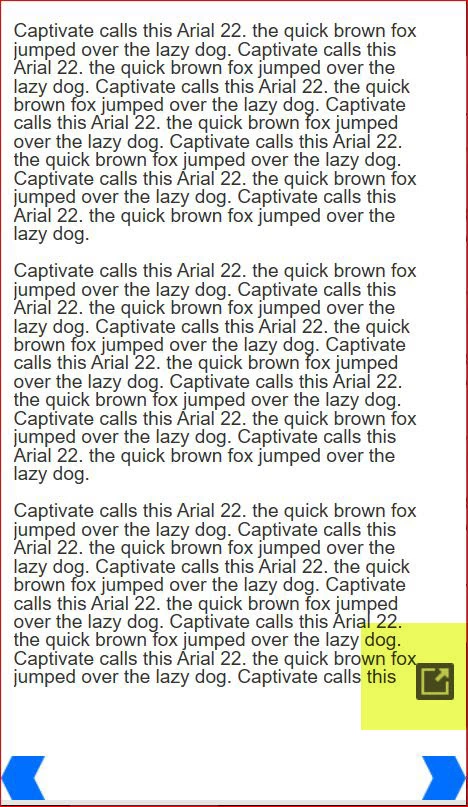
How do I force that fuid box to display all the text in that column? I've tried many ways and it seems like Captivate forces page height to the original 627 px or a max height.  Any suggestions?

    This topic has been closed for replies.
    Correct answer Lilybiri

    Did you decrease the minimum font size? It is set by default to 14pt which is way too high. I always set it to 10 or even 8pt.

    Fluid boxes cannot be completely compared with the creation of a web page. Maybe you could switch to Breakpoint views workflow which gives you more control but has also some disadvantages.

    Quite a while ago I wrote out this comparison:

    http://blog.lilybiri.com/fluid-boxes-or-breakpoint-views

    It may explain some of your questions.

    1 reply

    Lilybiri
    LilybiriCorrect answer
    Legend
    November 27, 2020

    Did you decrease the minimum font size? It is set by default to 14pt which is way too high. I always set it to 10 or even 8pt.

    Fluid boxes cannot be completely compared with the creation of a web page. Maybe you could switch to Breakpoint views workflow which gives you more control but has also some disadvantages.

    Quite a while ago I wrote out this comparison:

    http://blog.lilybiri.com/fluid-boxes-or-breakpoint-views

    It may explain some of your questions.