
riley1d20atBMC
Participating Frequently
June 9, 2010
Question

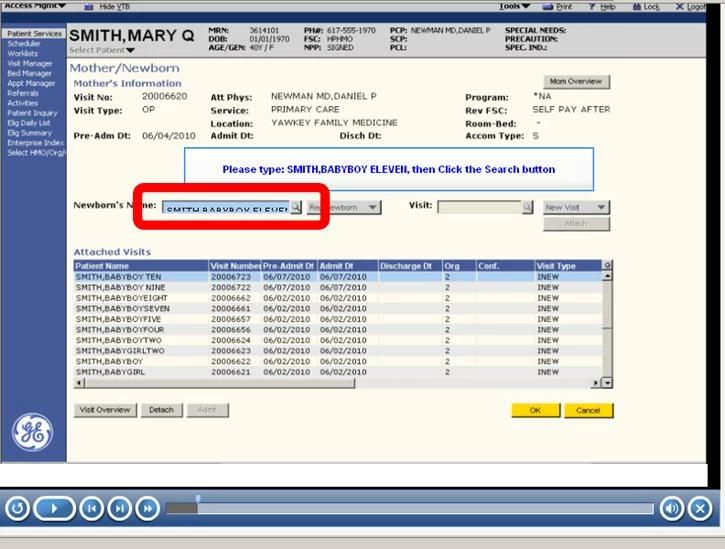
Text seems to hide behind the text box when entered in CP4?
  • June 9, 2010
  • 1 reply
  • 355 views

As you can see in this screenshot (and the glaring red to high light it) when the User types in the text on this slide (and all of the others as well) the words go in, but seem to fall behind the text box.  I don't know why this Kilroy effect (or for younger fans Wilson effect) is happening so I am turning to you oh mighty Adobe Community Forum, help!

This project is done except for this one recurring problem.  While this project could go forward like this, it would look a lot better it the text wes in the right spot when entered. 

Thanks...

Riley

    This topic has been closed for replies.

    1 reply

    Captiv8r
    Legend
    June 9, 2010

    Hi there

    Looks like you may need to adjust the size and position of the Text Entry Box. You may also find that adjusting the font helps a bit. Perhaps make it larger (or smaller) season to taste sort of thing.

    Cheers... Rick

    Helpful and Handy Links

    Captivate Wish Form/Bug Reporting Form

    Adobe Certified Captivate Training

    SorcerStone Blog

    Captivate eBooks

    riley1d20atBMC
    Participating Frequently
    June 9, 2010

    Thanks!  I got this to work, but it took some time to get the right match on the sie of the text box.  I finally went with the process of making the Text Box at last as large as the simulation I was burying it into.  Thanks for your help. I really enjoy using Captivate at work...