
Known Participant
August 9, 2018
Question

Textfixer with the web object

  • August 9, 2018
  • 1 reply
  • 703 views

I have needed to format a table and make it scroll-able so have used the web object to place it on the page as the scrolling text widget cannot be formatted. I meant creating the table and contents in HTML and compressing the code with text fixer and embedding it in the web object code entry input box in properties. It all works finer. However, (see picture below) a small v appears in the to left hand corner above the content. At first I thought it was a syntax error in my HTML but I have been through and this is not the error. I also thought was it using control v to paste the text into the entry box that was creating it within the pasted code. I have discounted this.

Has anyone else encountered this problem? If so how to I get rid of this v and get the content to align with the top of the web object.
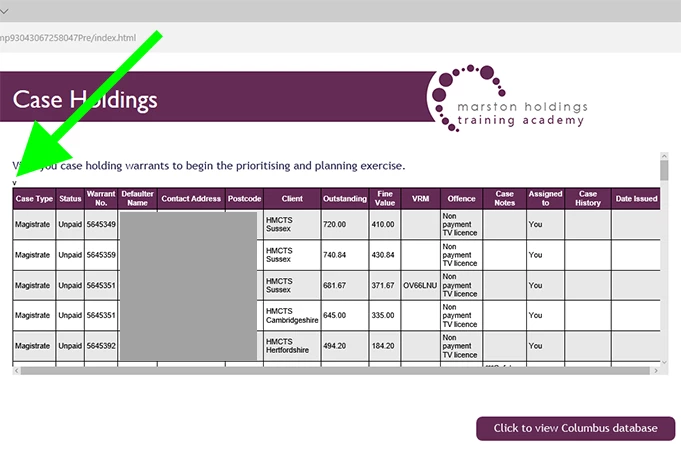
    This topic has been closed for replies.

    1 reply

    TLCMediaDesign
    Inspiring
    August 9, 2018

    You'd need to post the code of the html in the web object. That V is not in Captivate.

    Also, html code isn't that big, try it without the "text fixer".

    Known Participant
    August 10, 2018

    I have been through the code very thoroughly and cannot find any errors, it doesn't display a v if the code is viewed as a web page in a browser, it is only when pasted into the web object that the error occurs. I have tried pasting the uncompressed html in the embed code box and it only displays the opening html tag, it is also a problem pasting compressed code it seems to be a bit reluctant to register that it has been pasted in and always takes several attempts??

    TLCMediaDesign
    Inspiring
    August 10, 2018

    Try selecting the V using the developer tools in the browser. It should show you where it is in the html.