


Question
Thai vowels overlap with each other (Fonts)
Hello, I would like to ask about Thai alphabet in Adobe Captivate. The Thai vowels are overlap with each other when that word has more than 1 vowels. I already installed Adobe Captivate latest version (11.8.0.586) and already tried "Requires an indic composer for Indo-Arabic language support(for newly created projects only)" in Preference but still have this issue. I've attached for more understanding (First one is correct and second one is overlap).
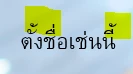

And another issue is when I double click these quiz text in Master slide, I cannot change to Thai language. Is it come from the system so I can not change or if I lock this object by mistake?
Thank you so much.
 AdChoices