February 2, 2012
Answered

The answers questions not selectable in quiz slide for some users

  • February 2, 2012
  • 1 reply
  • 760 views

We have a SCORM Captivate training content published on our LMS (SAP Learning Solutions). Some users can't respond to any questions in the content.For these users, the answers are locked and are not selectable. Also, the Validate and Erase buttons didn't appear.

The problem concerns about 10% of our users.

This training contains both content slides and quiz slides.
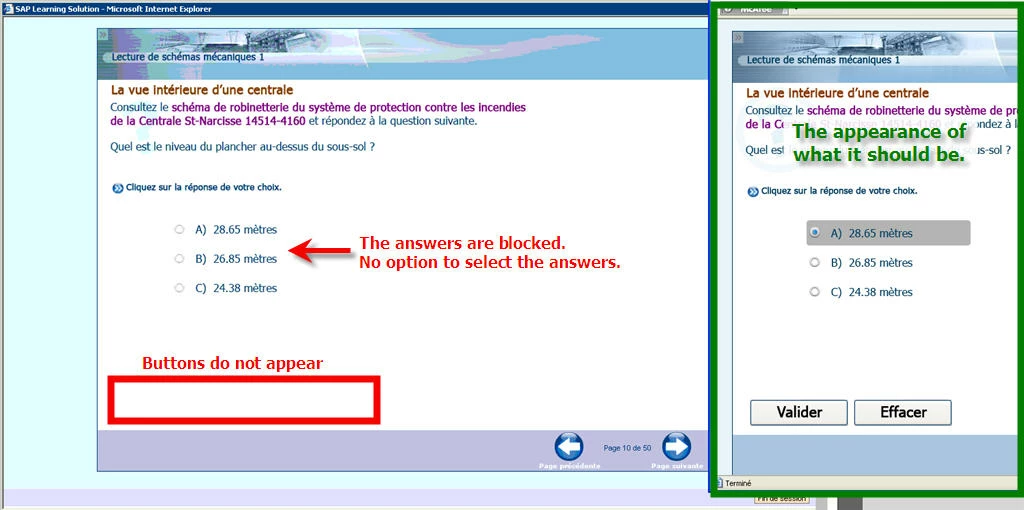
The content is published in SCORM 1.2 (SWF + HTML) with Adobe Captivate 5.5. We had the same problem for some users with the previous version of this training content published with Captivate 4.

All users have the same settings:

Flash Player 10.3.183.11

Internet Explorer 6

Microsoft Windows XP

This topic has been closed for replies.
Correct answer RodWard

Place a button on the first or second slide that you require the user to click to proceed with the course.  I usually place this on a slide that gives an overview of what the module will be about.  Once the user has finished with the slide, they need to click this button to continue into the content.  The user is unaware that this button has a score attached and that the FACT that it has a score means that Captivate considers it part of the quiz, which means the quiz scope begins at that point, not at the first quiz question.

Yes, you select the button, go to Properties > Reporting and select the checkbox to include in quiz.

1 reply

RodWard
Community Expert
Community Expert
February 2, 2012

The most likely reason for this behaviour is that your 10% of users have entered the quiz and then thought they might jump back to the information slides to check the answer.  On doing so they have exited the quiz scope which immediately locks the quiz.

Have you actually watched these problem users complete the quiz?  If you are able to do so, make sure that once they start the first question, they answer all quiz questions in turn without jumping to any other slides or leaving the quiz.  If my hunch is right, the person will be able to successfully complete the quiz.

If the desire is to allow users to jump back to the content section to check information, place a scored button on the first or second slide of your project.  This extends the quiz scope and will mean that the user is still within the "quiz" no matter what slide they want to look at.

February 2, 2012

Thank you very much RodWard.

Just to be sure when you say "place un scored button on the first slide".

I understand this:

  • Place an non visible button on the first slide
  • Go to the Properties in Communication Section
  • Check the box "Include in the quiz"

Is It exact?

RodWard
Community Expert
RodWardCommunity ExpertCorrect answer
Community Expert
February 3, 2012

Place a button on the first or second slide that you require the user to click to proceed with the course.  I usually place this on a slide that gives an overview of what the module will be about.  Once the user has finished with the slide, they need to click this button to continue into the content.  The user is unaware that this button has a score attached and that the FACT that it has a score means that Captivate considers it part of the quiz, which means the quiz scope begins at that point, not at the first quiz question.

Yes, you select the button, go to Properties > Reporting and select the checkbox to include in quiz.