Participant
February 12, 2015
Question

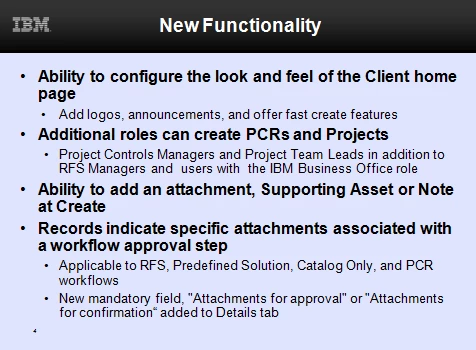
The formatting of one of my 2007 MS PPT slides is changed when imported into Captivate

  • February 12, 2015
  • 1 reply
  • 292 views

The bullets, indentions and font size of one of ten 2007 MS PPT slides are altered when imported into a Captivate project.


The PPT slide:
In Captivate:

I tried reloading Captivate. Deleting and re-adding the slide in question but nothing changes. Any ideas?

This topic has been closed for replies.

1 reply

Captiv8r
Legend
February 12, 2015

If the PPT is saved as a "PPTX" type, you should see an option for "high fidelity". You could try enabling that.

For my money, I like using the "Camtasia approach". Just present your PowerPoint as if you were presenting to an audience. Then use Captivate to record it as you present. You can record in the "stop motion" slide by slide recording or in the Video Demo recording. You can even coax PowerPoint into a smaller window if you need to.

Working this way should result in exactly what you hoped to see in Captivate.

Cheers... Rick

Participant
February 17, 2015

Using the High Fidelity option did the trick. Thanks so much for your help!