August 19, 2011
Question

The layout of the text in a caption is not correct in the published project

  • August 19, 2011
  • 1 reply
  • 1191 views

Hi,

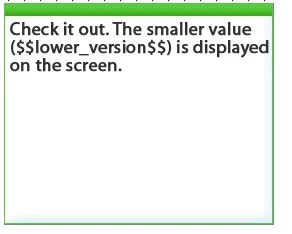
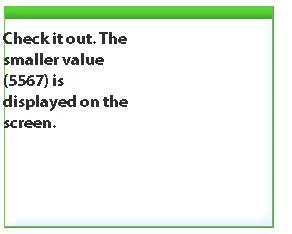
I am using CP5. When I review my published project, I found out that the layout/format of the text in a caption is not correct if there is a vairable in the text. The following two images show an example. The first image is what looks like in the editing project; the second one is what looks like in the published project. Any ways to make it displayed correctly?
Thanks,

Ya

This topic has been closed for replies.

1 reply

Lilybiri
Legend
August 19, 2011

Hi,

The text is rendered differently whenever a variable is inserted. I do not know the font size you used? Because such a tremendous difference I have never experienced myself. Is changing the font a possibility? What helps sometimes is to increase the quality of the slides. You can do this individually per slide (change from Low to High or Optimized) or when publishing by overriding the Slide Quality and set it for the whole project to High.

Lilybiri

August 19, 2011

Hi Lilybiri,

I use the following style for the text. I have tried different fonts and sizes, no help (even worse actually). Any font that you think might be helpful? I also tried different quality options, but nothing changed.

Lilybiri
Legend
August 19, 2011

Hi,

Puzzled, there is normally a visible difference between an text caption with/without a variable but this decrease in quality even with slide published as Optimized I never did see. Is it consistent on when viewing on different screens? And do you see the same when previewing in Browser, and in different browsers?

Lilybiri