
Answered
these icons
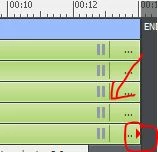
so what is the red play button intended for?
Also, I see the play icon on smart objects, what is the purpose? I assume to pause the object at this point?

so what is the red play button intended for?
Also, I see the play icon on smart objects, what is the purpose? I assume to pause the object at this point?
Red triangle means that the end of the object timeline is linked to the end of the slide timeline. If you increase the slide timeline, the end point of the object timeline will move to the right, its duration remains the same, which means the start of the object timeline moves to the right as well. Personally in training I always warn to avoid that, because it is rarely wanted. If you time an object for the rest of the slide (CTRL-E), increasing the slide duration will also move the end of the object timeline, but the start will not move, which means the duration of the object timeline will increase. That is mostly the situation that is commonly wanted.
You don't know what the vertical thin line means! It means the pausing point of an interactive object, will appear both for Click box (always at the end), Text Entry Box (default is at 1.5 secs), Button and Shape button (1.5secs). The double bar is IMO not the universal symbol for Play but for Pause: it looks like that on every device. It is not at the exact location of the pause, but indicates that a pause is occurring, which is at the fine vertical bar. Check the Timing panel, you'll see the exact timing of the pause there.
Question slides also have a pausing point, default 1.5secs, but this is NOT showing in the Timing properties panel.
D&D slides have also a pausing point at 1.5 secs, which doesn't show up in the Timeline but can be changed in the D&D panel.
If you set a shape button on a master slide to Pause, it will always pause at the end of any slide to which the Master slide is applied.
More about timeline for newbies in this very old post:
Already have an account? Login
Enter your E-mail address. We'll send you an e-mail with instructions to reset your password.
 AdChoices