
Inspiring
May 11, 2017
Answered

Timeline goes blank; can't scrub playhead (Cp9)

  • May 11, 2017
  • 1 reply
  • 325 views

Hi all...

I am running into a repeated issue where I will be working on a slide and the timeline goes blank and the playhead becomes unselectable:
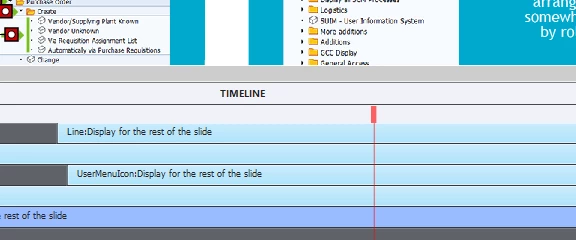
I have to restart Cp if I want to continue.

And before we go there, I am now in the habit of emptying the cache every time I close. I've done it three times today and within 10-20min this happens again.

Brand new computer, Win10. Suppose I should upgrage to Cp2017?

This topic has been closed for replies.
Correct answer RabidSquirrelNinja

Hi Lily... I think I found a workaround.  It seems to be a funky display issue.  If I click on another slide and come back or if I scroll the bottom scrollbar back and forth enough the playhead becomes selectable again and I and continue scrubbing or placing the playhead elsewhere in the timeline.

Annoying but managable!

Thanks for your quick reply, though!!

1 reply

Lilybiri
Legend
May 11, 2017

Did you try to reset the workspace?

RabidSquirrelNinjaAuthorCorrect answer
Inspiring
May 11, 2017

Hi Lily... I think I found a workaround.  It seems to be a funky display issue.  If I click on another slide and come back or if I scroll the bottom scrollbar back and forth enough the playhead becomes selectable again and I and continue scrubbing or placing the playhead elsewhere in the timeline.

Annoying but managable!

Thanks for your quick reply, though!!

Lilybiri
Legend
May 12, 2017

Resetting workspace will do the trick as well.