


Participant
November 25, 2021
Question

Timeline issues

  • November 25, 2021
  • 2 replies
  • 156 views

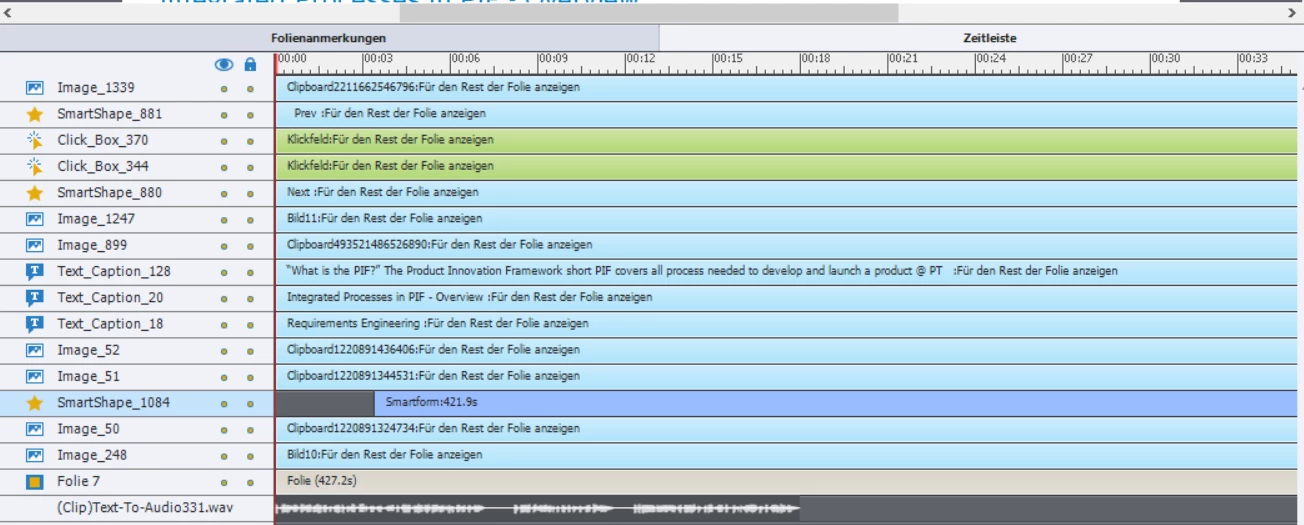
As soon as i move an animation in the timeline it is no longer displayed in the html5 browser view. Can someone please help me. I have already removed all the pauses and set all the slides so that they are displayed until the end. 
    This topic has been closed for replies.

    2 replies

    Lilybiri
    Legend
    November 25, 2021

    You didn't show the full Timeline panel. Why did you increase the duration of the slide beyond 18secs since the audio clip ended already? 

    Check the On Enter event of that slide: it may be set to Pause? If this slide is based on one of the Quick Start Projects of the Assets panel, they have a lot of slides which are paused on Enter (bad practice IMHO).

    You talk about 'animation' but the selected object is a simple shape.

    RodWard
    Community Expert
    Community Expert
    November 25, 2021

    Something on the timeline layers must still be pausing the timeline. 


    Check the Master Slide being used for this slide to see if there are any interactive objects there.


    If there are no interactive objecs on the Main Master or child master slide, take a copy of the project and start deleting items from the slide one by one, previewing as HTML5 each time to see which item is causing the issue.