
Participating Frequently
October 10, 2017
Answered

Timing Buttons that "Change State" of Multi-state Object

  • October 10, 2017
  • 1 reply
  • 981 views

Hi – I’ve designed a slide with multiple shapes configured as buttons. Each button has a different term on it, and each button’s Action is "On Success Change State of" a multi-state shape named text_placeholder_shape.  As the user clicks each button, a different state displays the definition of each button’s term in text_placeholder_shape. 

None of the term buttons includes a Pause, and I’ve unchecked the checkbox “Continue Playing the Project” for all of them as well.  The slide also includes a separate navigation button configured with a Pause, which the user clicks to continue the course after they’ve viewed all definitions.

The term buttons work correctly if I set them up on the timeline so they are already on the slide when the user enters the slide.  But if I try to time the buttons to appear on the slide one by one, and a click-happy user clicks one of the buttons before all have appeared, the buttons that have not yet appeared never do appear on the slide.

I can avoid this by designing slides with buttons that control a multi-state object so the buttons are already on the slide when the user enters the slide, but this does limit one’s design options.  Does anyone know if I’m doing something wrong, or has anyone come up with a way around this?

Thanks in advance.
This topic has been closed for replies.
Correct answer Lilybiri

I tried moving the Pause on the Return button to 13 sec on the timeline, but clicking a Term button again still made the project go to the next slide. Then I tried moving the Pause on the Return button to 10 sec on the timeline, but still with the same result: clicking a Term button again made the project go to the next slide. So then I added Pauses back in to the Term buttons and positioned all Pauses on all buttons at 13 sec on the timeline and unchecked the "Continue Playing" box on all Term buttons, but the original problem still remains: if the user clicks any Term button before all display on the slide (at any point before 9 sec, which is when the Return button displays), the remaining buttons don't display on the slide.


You are correct, there is a conflict between the need to have the playhead continue to have the later buttons appear, and the multiple clicks that want to enable to show the information.

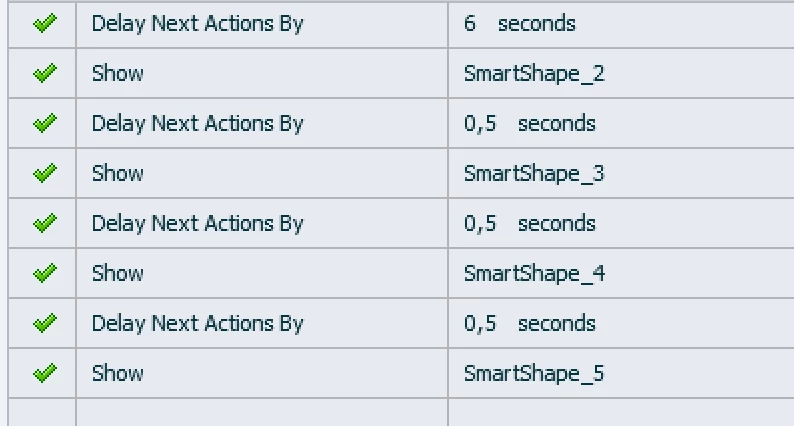
You'll need another approach. Which version are you using? If it is not an old version, you do have the command 'Delay Next actions.....'. I would have all buttons timed on the slide from the beginning, but hidden in output. You can use the On Enter event of the slide to have the buttons appearaing in a staggered way:. Something like this:

That action will be executed even if the playhead is paused by clicking on a button, I have double-checked (and will present in two weeks about work flows like this on ALS).

1 reply

Lilybiri
Legend
October 10, 2017

Can you track the frame number by inserting the system variable cpInfoCurrentFrame in a text container? The problem is not totally clear to me, would like to see the timeline as well. The option 'Continue playing the project' is normally meant to avoid that the playhead which is paused at the pausing point of the interactive object is not released. But you took out the pausing points. For that reason I suggested to track the frame number to see what is happening when you click a button before the rest has appeared.

TryCap59Author
Participating Frequently
October 10, 2017

Here is the timeline:

I inserted the variable you recommended and it shows that the slide pauses when the user clicks any button. I took this screenshot after the slide paused - the remaining buttons on the timeline never display, and "Term 3" remains half-loaded. (The pause can occur at any frame because the user can click any of the buttons at any time before all display, with the same result: the rest don't display.)

Lilybiri
Legend
October 10, 2017

That is what I expected: since you took out the option 'Continue Playing the project' the playhead is paused when the button is clicked and will not continue. You have to check the option 'Continue Playing the project' again. In that case the playhead will continue smoothly until it is stopped by the pausing point of the Return button. I would not put that pausing point really at the last frame myself, it is safer.