


August 23, 2010
Question

Title of project in folder is wrong

  • August 23, 2010
  • 2 replies
  • 473 views

I am unable to take a complete screen shot, so hope I can explain myself clearly:

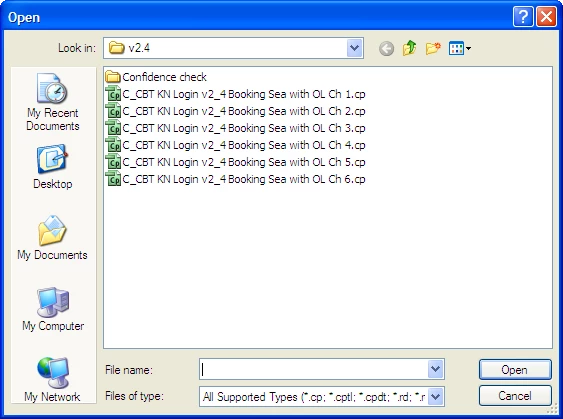
When I am looking for a project to launch and work on, via Adobe Captivate I can open up a folder as below.

When I place my mouse pointer over any of these I get a small pop-up wondow (cann capture this) which tells me following

Type / Title / Date Modified / Size.

Where does the title information come from that you see in the pop-up? The title details I am seeing are not the same as I have save the project as...and I am worried when this is published people are going to see the incorrect title.

Noel

Staffordshire

England
    This topic has been closed for replies.

    2 replies

    james@contenucle
    Participant
    February 10, 2021

    In 2021, Google leads here so ...


    POSSIBLE SOLUTION : SCORM Manifest

    During Publish, click on the "More" button at the bottom,  then the "e-learning output: SCORM" link bottom right, then "Configure" at the top.


    Check what Title, Identifier, etc you have here.


    Good luck!

    Captiv8r
    Legend
    August 23, 2010

    Hi Noel

    I'm not certain where Captivate places this information. Or even if it is configurable from inside Captivate. But I see you have provided a screen capture showing .CP files. Note that those are *SOURCE* files. Files your end users will likely never know exist. You should be concerned with *OUTPUT* files and what those contain.

    Additionally, I believe what you see in the tooltip is somewhat determined by your Windows settings.

    Cheers... Rick

    Helpful and Handy Links

    Begin learning Captivate 5 moments from now! $29.95

    Captivate Wish Form/Bug Reporting Form

    Adobe Certified Captivate Training

    SorcererStone Blog

    Captivate eBooks

    August 23, 2010

    Hi Rick,

    Thanks for that. When creating a .cp I always to to Edit/Preferences/Project/Info and make sure the project name is the same as the file name. So when I saw the tool tip pop up telling me it was named something else, I thought I was doing something worng. But you are right, it is the OUTPUT that is important.

    Thanks again.

    Noel