
TOC Gradient - Won't Go Away
I'm using Captivate 5.5.
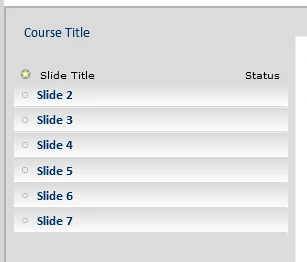
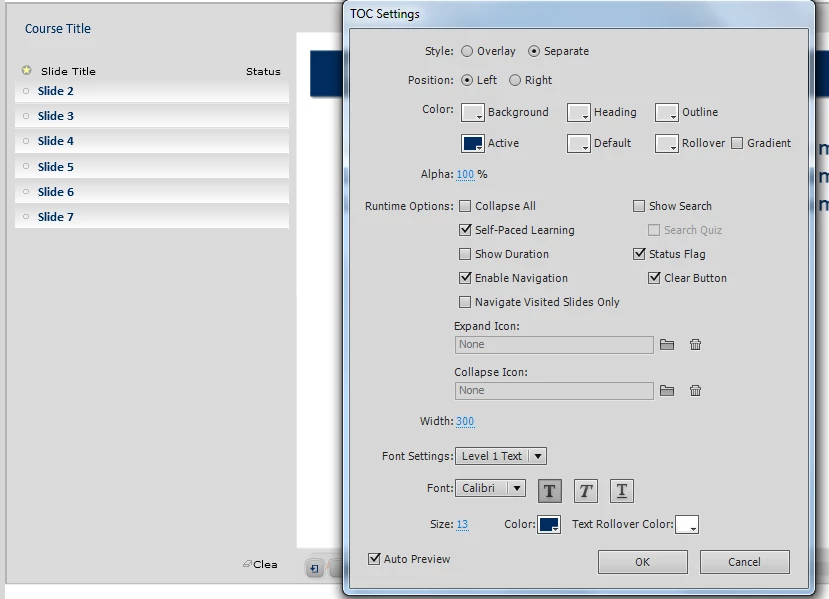
The TOC Gradient won't go away even if the Gradient checkbox is unchecked in the TOC settings.
Here is what the TOC in my project looks like:
and here are the settings that are producing the above TOC:
Here's what I've done so far to try to fix this:
1. I've checked and unchecked the Gradient checkbox in the TOC Settings a million times. No effect.
2. I've changed Skins to some of the default ones. Still, the gradient remains even if the checkbox is unselected.
3. I cleared the Captivate Cache by clicking the 'Clear Cache' in the Preferences menu. I've done this both with both my main project open, and then when I saw it say that it would not clear it for the currently opened project, I switched to an old project and cleared it again then reopened the new project. Still, the ugly gradient remains.
I'm also noticing that 'Navigate Visited Slides Only' option in the TOC Settings was sometimes becoming re-checked on its own when I would change other settings. But, that only happens sometimes and is a minor annoyance comapred to the gradient.
Help! : ) The gradient is ruining the look of the skin completely, as I want a very clear, clean user interface without gradients or textures.
 AdChoices