inna88sf
Known Participant
July 15, 2015
Answered

TOC question-- long slide titles

  • July 15, 2015
  • 1 reply
  • 323 views

Hi folks,

I have just started using TOCs (never felt like I needed to before), and have found them a bit cumbersome to configure. The Settings section is NOT intuitive.

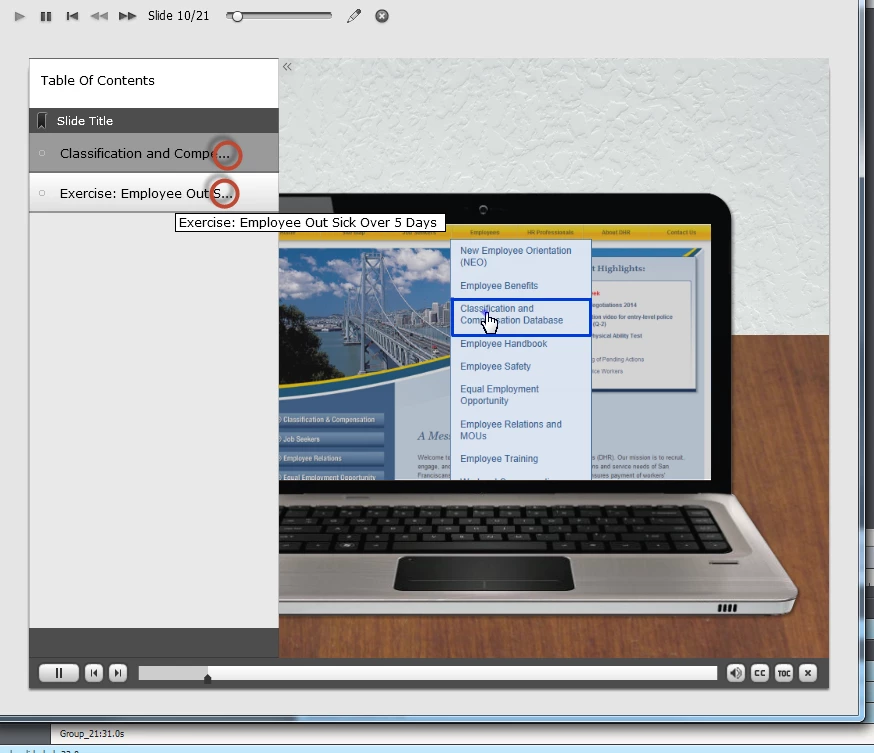
Anyway, I have a flew Slide titles that are long and I'm wondering if they could simple take up two lines instead of the "...." (See below)

Thanks for your help.

This topic has been closed for replies.
Correct answer Lilybiri

Text wrapping is not possible. It would make the TOC much longer as well, wondering if that is a good choice. You can however change the font size and the width of the TOC using the Settings. Did you look at them:
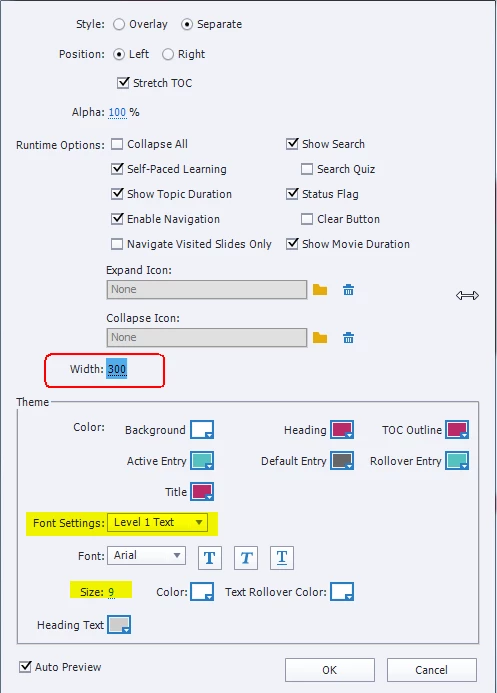
In this screenshot I increased the width of the TOC from 250 to 300px. For the Level 1 settings (those are your slide titles, if you use groups you'll have to change the Level 2 settings) I decreased the font size from the default 12pt to 9pt.

Moreover are you aware that editing the text is possible as well? You don't have to keep the slide names (I would never use spaces in slide names or in any name BTW, but that is another discussion), you can double-click and change the text. Do that only as a last action, not when you still have to use the button to refresh TOC settings.

1 reply

Lilybiri
LilybiriCorrect answer
Legend
July 16, 2015

Text wrapping is not possible. It would make the TOC much longer as well, wondering if that is a good choice. You can however change the font size and the width of the TOC using the Settings. Did you look at them:

In this screenshot I increased the width of the TOC from 250 to 300px. For the Level 1 settings (those are your slide titles, if you use groups you'll have to change the Level 2 settings) I decreased the font size from the default 12pt to 9pt.

Moreover are you aware that editing the text is possible as well? You don't have to keep the slide names (I would never use spaces in slide names or in any name BTW, but that is another discussion), you can double-click and change the text. Do that only as a last action, not when you still have to use the button to refresh TOC settings.
inna88sf
inna88sfAuthor
Known Participant
July 16, 2015

Thank you! Will play around more with the Settings.