
September 4, 2012
Answered

TOC Self-Paced Learning

  • September 4, 2012
  • 2 replies
  • 5586 views

Captivate v5.5

I am trying to test the Self-Paced Learning option on the TOC.

I have created a CBT with a TOC and have selected the Self-Paced Learning option.
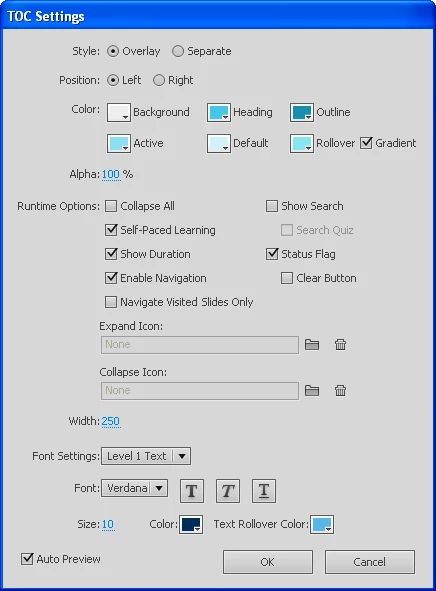
I run the project (F4) and stop it after 3 chapters. I look at the TOC and there are the required green ticks on the TOC for the first 3 chapters - all fine so far.

Then I run the project again (F4) but the project starts from slide 1 and the ticks are no longer visible.

Will this option only work once the project has been uploaded to our LMS or am I doing something wrong ?

Thanks in advance,

Noel

    This topic has been closed for replies.
    Correct answer RodWard

    Actually, the Self Paced Learning option is of no use at all if you have published your project with settings to report to an LMS.  It can only be used when Quiz Settings > Enable Reporting for this Project is deselected.

    When publishing for an LMS, Captivate always assumes you will be using Resume Data bookmarking, NOT Self Paced Learning bookmarking.

    However, although Resume Data Bookmarking is designed for LMS integration, it does not update the Captivate TOC markers on subsequent user sessions as does Self Paced Learning.

    It's one of those nice little Catch 22 situations...

    2 replies

    Participating Frequently
    September 5, 2012

    Hi Noel,

    Self paced learning works when you publish your project to one of the trusted folders.  Try including the published location as trusted location and verify.

    Regards,

    Avinash

    September 5, 2012

    Thanks Avinash,

    Please also see my reply to Rod.

    Noel

    Priyank Shrivastava.
    Inspiring
    September 4, 2012

    Hi Noel.

    This option will work with published output. Please publish your project and then open it in a web browser(IE, Mozilla) and then close it, reopen the project, It will give you a pop up in your machine "Continue from where you stopped last time?" with "Ok and Cancel". You will not get any popup in LMS.

    Hope this helps.

    Thanks

    Priyank

    Thanks, Priyank Shrivastava
    RodWard
    Community Expert
    RodWardCommunity ExpertCorrect answer
    Community Expert
    September 4, 2012

    Actually, the Self Paced Learning option is of no use at all if you have published your project with settings to report to an LMS.  It can only be used when Quiz Settings > Enable Reporting for this Project is deselected.

    When publishing for an LMS, Captivate always assumes you will be using Resume Data bookmarking, NOT Self Paced Learning bookmarking.

    However, although Resume Data Bookmarking is designed for LMS integration, it does not update the Captivate TOC markers on subsequent user sessions as does Self Paced Learning.

    It's one of those nice little Catch 22 situations...

    September 5, 2012

    Thanks Rod,

    My project is going to be published on the LMS, so it is good to know the "Self-Paced Learning" TOC option does not work on the LMS.

    Thanks again,

    Noel