Known Participant
February 17, 2016
Answered

toggle images on/off in Cap9

  • February 17, 2016
  • 1 reply
  • 820 views

I'm not sure how to setup my advanced actions for my slide.

I’ve got 14 buttons for a 14-question self-assessment. The Self-assessment is self-scoring, so 9 out of the 14 questions have a scoring value (1) added, the other 5 do not have a scoring value (wrong answer). Each question has its own variable and advanced action. I tried to follow a way to do this via an eBook that I think was written for Cap7, so I didn't use the actual "toggle" action. Can someone help me update my advanced action for Cap 9?
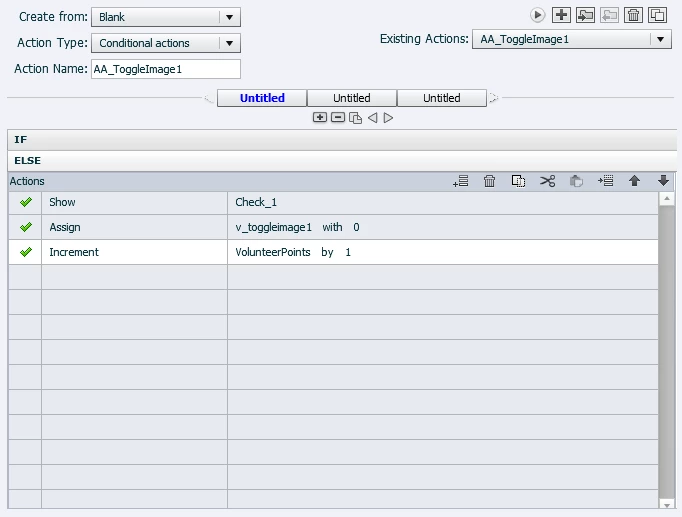
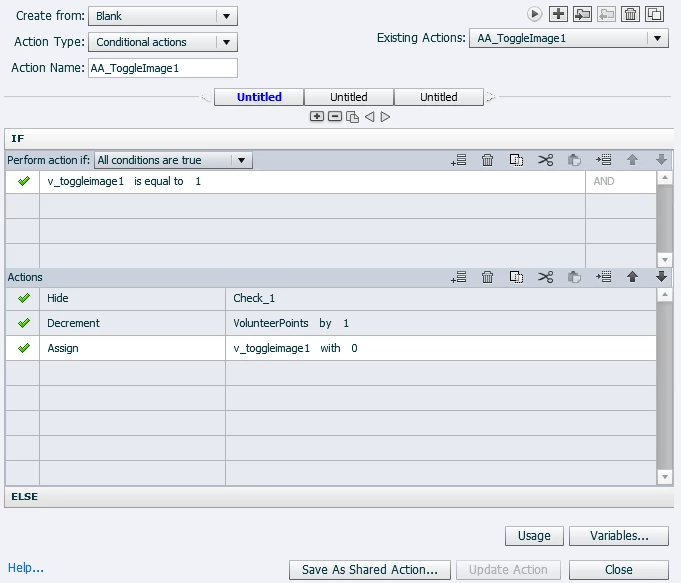
    This topic has been closed for replies.
    Correct answer Lilybiri

    Yes, I think you may be getting at just doing a standard multiple answer quiz slide. I think that's all I need. Basically the person will take the self-assessment and see if they're goals fall in line with the organizations overall goals. It's self-scored right after the questions for them to review and reflect on only. No additional reporting is needed to be communicated.

    Thank you for your help.


    You can use MCQ and choose for multiple correct answers, then have partial scoring set on. You automatically will get a total of the checked boxes in the system quizzing variable cpQuizInfoPointsscored (if there is only one slide) or in cpQuizInfoLastSlidePointScored just after the question slide.

    Another link: Graded Survey? - Captivate blog

    1 reply

    Lilybiri
    Legend
    February 17, 2016

    This looks too much complicated. Did you define all those variables with a default value of 0? Which default value did you give them? Do you need to report the score? Is my understanding correct of what you want to do?

    • You have 14 interactive objects (buttons), 9 have a score of 1point, 5 have no score: did you attach that score in the Reporting section? If yes, why do you still track the score with a user variable (Volunteerpoints), since it is already tracked by the system variable cpQuizInfoPointsscored?
    • You are in Captivate 9: why do you use a checkmark with hide/show instead of adding a state to the 'button'?

    If you don't need to report, and want to have the score in the user variable v_points (sorry I'll use that shorter word for your Volunteerpoints), and user can 'un'click a button which will need decrementing the score, but not for a 'wrong' button. This means you'll need 2 different conditional actions, one for the correct buttons, and one for the wrong buttons. I would use a shared action in this case.

    A. For wrong buttons:

    IF v_one is equal to 0

        Toggle v_one      v_one will be the first parameter

        Show check1            check1 will be second parameter

    ELSE

        Toggle v_one      v_one  is already defined as first parameter

        Hide check1        check1 is already defined as second parameter

    B. For correct buttons

    IF v_two is equal to 0

        Toggle v_two      v_one will be the first parameter

        Show check1            check1 will be second parameter

        Increment v_score by 1        no need to define v_score as parameter

    ELSE

        Toggle v_one     

        Hide check1  

        Decrement v_score by 1       

    Known Participant
    February 17, 2016

    Hi,

    Thank you for your help. I started programming it this way because it's what I found off of youtube. Do you have a better solution for allowing a user to select what is True for them from 14 statements and then to be able to view their results? We're basically asking the learner if it's the right time in their life to commit to a non-profit organization, or should they reconsider helping out in other areas.

    Lilybiri
    Legend
    February 18, 2016

    A lot of videos on YouTube are not to be trusted, incomplete or for older versions of Captivate.

    I gave you a solution, based on your original question.


    But if you explained the goal in normal sentences, maybe there could be a better work flow. Important information I'm missing is:

    • What do you want to do with the 'score' in Volunteerpoints? Maybe you don't need a score but something else
    • You allow the user to change his answers, it could be easier to add a 'button' labeled 'Submit' that will execute the evaluation only when the user has decided that his answers are correct