



Top Number Row works but Number pad in Adobe Captivate 2017?
Hi everyone, I am adding a clickbox where user has to press ALT + 2. However, when he/she clicks on number 2 in top number row it works perfectly, but when he/she clicks on 2 in number pad, it does not happen anything!
In other words, video doesn't proceed when I click on number pad.
I've already tried to create 2 clickboxes in the same spot, where I set two different shortcuts (ALT + 2 from both places).
However, it didn't work. Please, it is something that had everything to be easy, but it is consuming much time, more than expected so far. I hope you can understand and help me. Next, you will find a screenshot of my project, where I am trying to set this command "PRESS ALT + 2" (in Portuguese, my first language) for showing a menu shortcut:
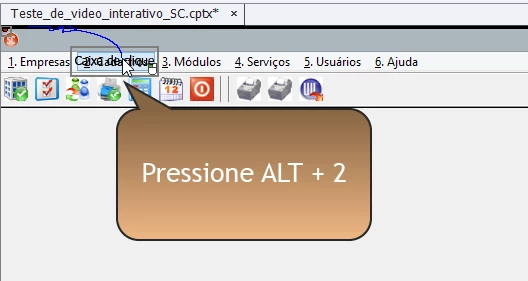
PS: I've searched and read another topics about this issue, but none of them has shown a solution so far to this issue.
 AdChoices