
Known Participant
February 1, 2020
Answered

Transform properties in Responsive Project

  • February 1, 2020
  • 1 reply
  • 389 views

Hi,


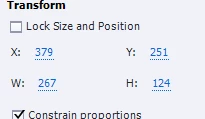
For now projects I can see these Transfor propeties under Properties > Options tab. But for the responsibe projects, I can't see it. I enabled my custom workspaces too. But couldn't have a luck. It is really important for me to adjust X,Y,W,H properties properly. Is there any work around?


thanks

This topic has been closed for replies.
Correct answer Lilybiri

Bit confusing, do know it.


What you show is under the Options tab, for non-responsive projects in the first place.


Responsive projects can have two workflows:

  • Fluid Boxes:  absolute size and location doesn't make much sense. Keeping width/height ratio when needed is much more important. Size and location depend more on the configuration of the fluid boxes than on the individual elements. 
  • Breakpoint views: you need to set up everything in the panel Position Properties. In many instances the units uses will be %, not px. To add to the confusion, it is also possible to have objects or slides in Fluid Boxes projects, which use this panel, instead of putting them in Fluid boxes.

1 reply

Lilybiri
LilybiriCorrect answer
Legend
February 1, 2020

Bit confusing, do know it.


What you show is under the Options tab, for non-responsive projects in the first place.


Responsive projects can have two workflows:

  • Fluid Boxes:  absolute size and location doesn't make much sense. Keeping width/height ratio when needed is much more important. Size and location depend more on the configuration of the fluid boxes than on the individual elements. 
  • Breakpoint views: you need to set up everything in the panel Position Properties. In many instances the units uses will be %, not px. To add to the confusion, it is also possible to have objects or slides in Fluid Boxes projects, which use this panel, instead of putting them in Fluid boxes.
Known Participant
February 1, 2020

Thank you for your time and your detailed explanation. Now, I got it!