Inspiring
March 7, 2013
Answered

Trouble with resetting toggle buttons that Show/Hide captions

  • March 7, 2013
  • 1 reply
  • 2341 views

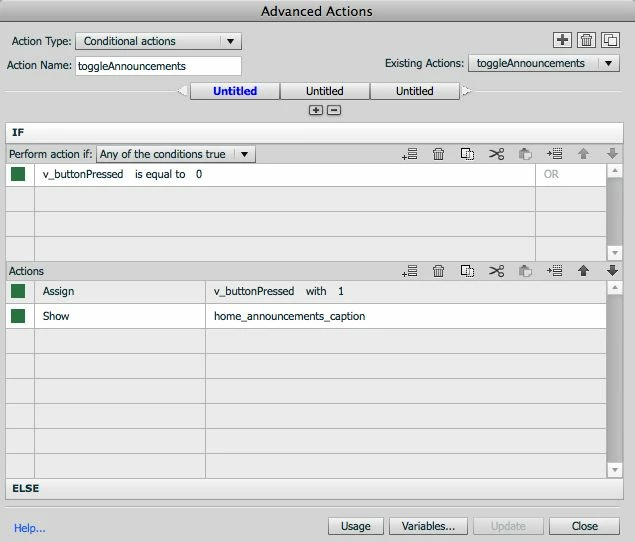
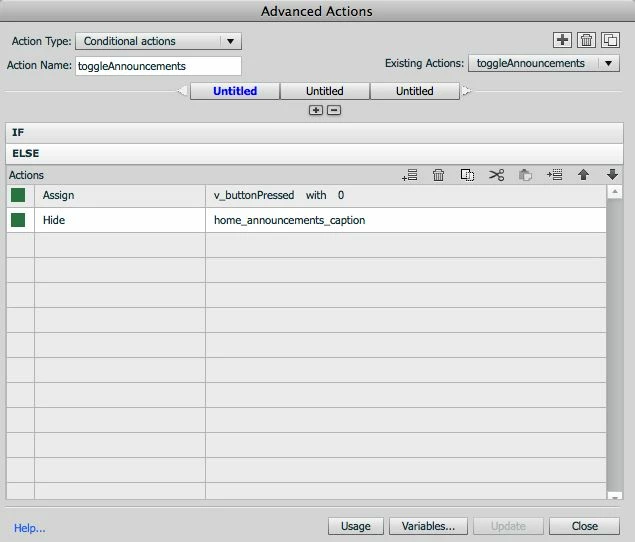
I have a problem with resetting the toggle buttons I use to show/hide a number of captions on a single slide. The toggle works great on the first button when I click it on and off to show or hide a caption. One click on, and the caption shows. One click off, and the caption disappears. However, if I leave a caption displayed and click on other buttons to show/hide other captions, they don't display or hide on just one click. They require two clicks. It appears something is holding up the playhead after the first toggle button is used until there's a second click. The same thing happens if I have a reset action On Enter. If I click on a caption and leave it up and move on to another slide, it does disappear when I re-enter that initial slide. However, it requires two clicks, not one, to display the caption. I find that extremely strange; I have learned most of my techniques from Lilybiri's blog, but this problem doesn't happen on her examples. I believe I am missing something obvious, but can't figure out what it is. Any assistance is great appreciated.
This topic has been closed for replies.
Correct answer globosonic

Are you using CP6? Perhaps it is mentioned somewhere but cannot find it immediately.

Bit worried about your sentence '. but if I can get this work, I would have many opportunities to re-use'. You cannot easily use advanced actions in other files, no import/export for the moment at all. The only way is to save the file as a template and use that template to create future files.

Since you do not need my third scenario, but want the user to keep everything open, this makes it already bit easier, but you'll certainly need a variable/button on a slide. You can reuse those variables on other slides.

In your use case there is certainly a need to do serious planning to avoid too many variables, scripts etc. Having blogged several times about that kind of planning. Some links:

http://lilybiri.posterous.com/beat-the-system-save-time-creating-advanced-a

http://lilybiri.posterous.com/link-score-to-attempts-in-custom-questions

To reset things when re-entering the page I would recommend to group all texts that have to be toggled in one group (if you use CP6), so that the On Enter action can be reduced to 'Hide Grp...'. Of course if those texts are different on each slide, you'll have a different group and will have to create such an On Enter action for each slide. But only one statement instead of a whole bunch saves already a lot of time.

http://www.youtube.com/watch?v=Sy09xPoP69A

If you want me to have a look, you can send a Private message,

Lilybiri


Yes, I am using Cp6. What I meant about re-using is that I have many different scenarios where a similar script could be used, so your suggestion of a template is a good one. My initial intention was to write it out in a ,txt file for reference. Thanks so much for the links and all your suggestions. I'll keep you posted.

1 reply

Lilybiri
Legend
March 7, 2013

You are pointing to which of my blog posts?

Could you post a screenshot of the timeline? Do the buttons all have their pausing point at exactly the same place?

Lilybiri

Inspiring
March 8, 2013

Hello Lilybiri:

Firstly, thank you so much for reviewing my question. Your feedback is highly valued by a relative newbie like myself. I am using click boxes for buttons (transparent click boxes over images). The buttons all pause at the same place. I'm sorry, but I can't recall the specific blogs I am referring to -- without doing some digging -- but in this case, I was primarily referring to the reset method of using On Enter and an Advanced Action that hides all captions. Does it make a difference that I'm using click boxes and not actual buttons for this? Many thanks in advance.

Inspiring
March 8, 2013

Hi globosonic!

I think (one) issue here is that while you are hiding the captions upon entering the slide, you aren't setting the caption's respective variables to 0.

This means that when the captions hide, the variable for a caption already shown (but now hidden) stays 1. If you click a button to show it again, the code "thinks" it is still visible and hides it (even though it is already hidden).