Known Participant
March 9, 2023
Answered

Trouble with reviewing content carousel slides upon return to slide

  • March 9, 2023
  • 1 reply
  • 1547 views

Hello all,


I have a problem with a content carousel slide not "resetting" upon a return to the slide.


Here is the flow:


1. Slide A is a 3 item content carousel (content is placed on a smart shape with the following states: Normal, Notes01, Notes02, and Notes03). I have shared actions for forward and backward buttons. The smart shape button to go to next slide (which I have labeled as Continue) remains hidden until all the content in the carousel has been viewed. Users can go back and forward as much as they wish in the content before leaving the slide by hitting the "Continue" button (which I have set as "on succes" to take viewers to next slide). It works as intended on the initial visit.

2. Clicking Continue takes viewers to a knowledge check slide.  The knowledge check slide has submit and back buttons visible.

3. If a view opts to go back to review the content carousel from the KC slide, the fwd and back buttons are inactive, or they become inactive after a few clicks, depending on where the viewer "parked" the carousel before pressing the smart shape Continue button


I sense the problem might be with the variable not being reset upon return to slide. I set the slide to "Assign var_notes" to Zero upon exit, (because I am hiding the back button of the carousel navigation upon entry) but that didn't help. 


Does anyone have insights they could share?


Thanks, 

Shane Elder
This topic has been closed for replies.
Correct answer Lilybiri

Hi again ,


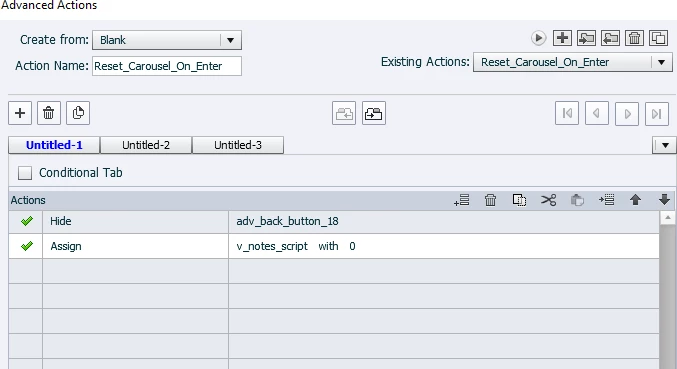
I created the simple Advanced Action to assign the variable with zero and to hide the back button, but still, upon re-entry, the screen looks as if the variable is set to zero, but the forward button is inert. Something is "turning off" the forward button... "might it be the presence of the Next Slide button? " I thought?


So  I tried to add "Hide the Next Slide button in the On Enter Advanced Actioni (the one that assigns the variable back to zero) but still the Forward button was inert and the slide had a 3 second default duration and continued to next slide.


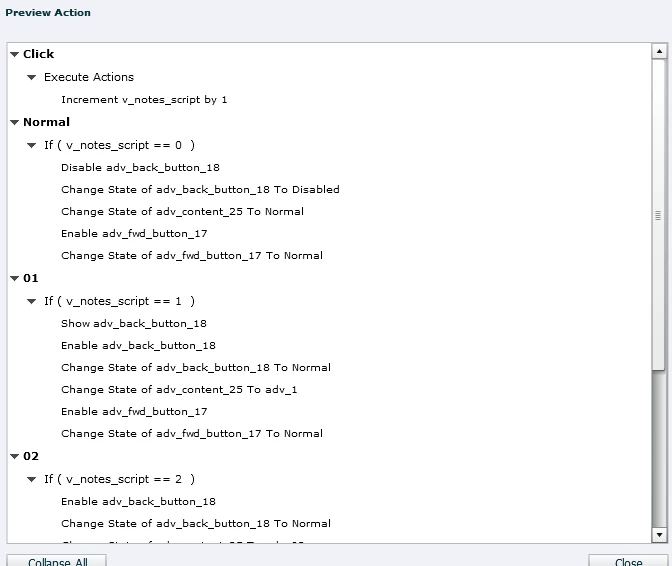
I re-wrote the shared actions as advanced actions so I could screen shot a preview, would you be able to look at that, maybe I'm missing an obvious step in the script?  


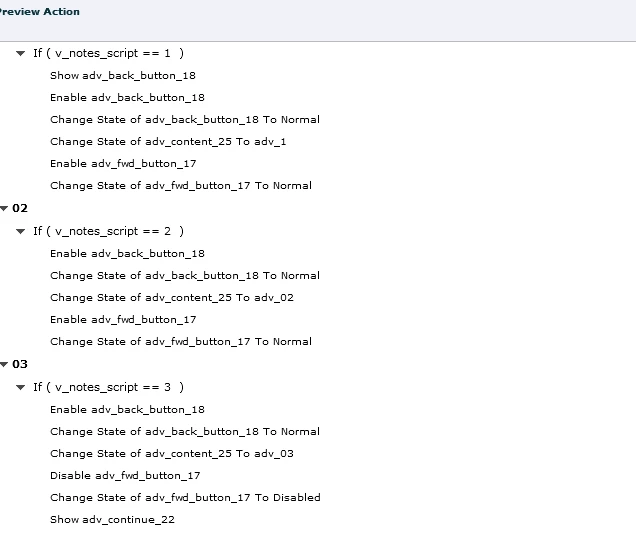
Here is the preview for the forward button


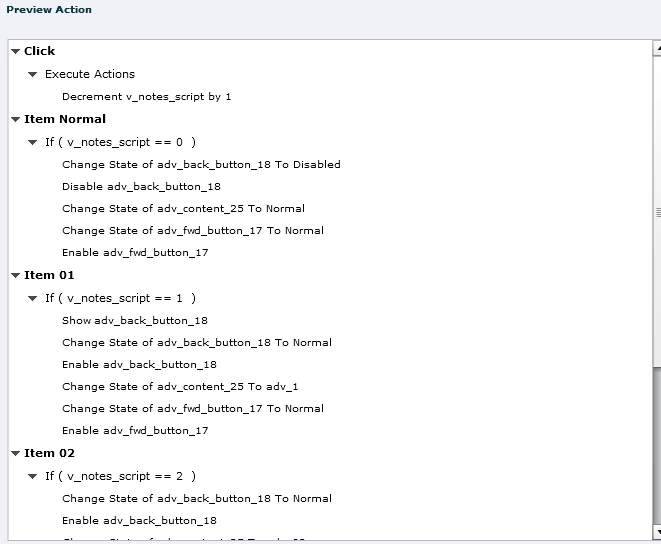
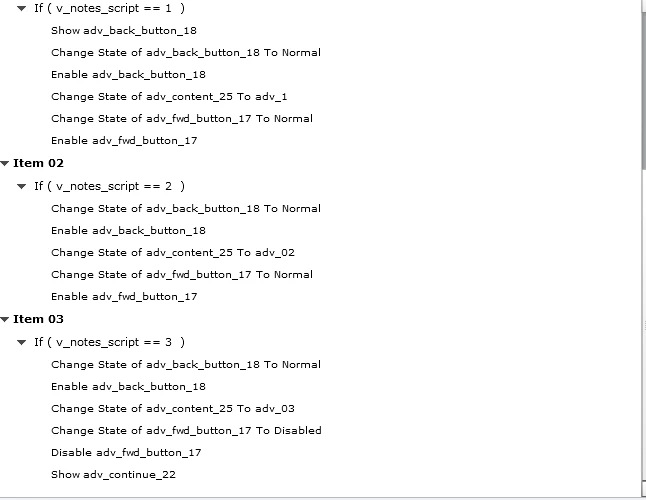
Here is the advanced action preview for the Back button

And finally the simple Advanced Action for resetting the variable to zero on entry

So my hope here is that maybe you can see something that was in the Advanced Action on which the shared actions that I was using are based. Again, they were perfectly on the first pass through but on re-entry, even with a variable being assigned zero, the navigation buttons are inert.


I know you've already spent some time on this, but anything you can do to help would be appreciated... the clock  is ticking and I can't figure this out.

Thank you!


What happens at the end with the decision which is showing the Continue button?

For a quick solution, extend the Advanced action On Enter, and add the Enable... for the button you want to activate immediately, I suppose it is the Next image, which may have been disabled at the last action before the Continue button was shown. It seems like you don't have any button enabled when re-entering the slide, and that means there is no pausing point neither.

BTWI will close now, it is 11pm here.

1 reply

Lilybiri
Legend
March 9, 2023

If you could answer some questions and add screenshots, I may be able to help.

  • Did you activate the option 'Retain State' for the multistate object?
  • What is the 'variable' you are pointing at? Maybe you can insert a screenshot of the shared/advanced actions ou are using? If you have multiple decisions, please use the Preview window of the action instead of multiple screenshots.
  • To detect the used events, please add a screenshot of the Advanced Interaction panel (F9)
  • Can you post a screenshot of the Timeline?
Known Participant
March 9, 2023

Hi again Lilybiri,


I am so glad you responded, I was hoping you would!


No, I did not  click "Retain State" for the smart shape multi state object I'm using as a content container. Should I?


Screen shot of shared advanced action preview:


Screen shot of Advanced Interaction Panel (F9)


Screen shot of Timeline


Lilybiri
Legend
March 9, 2023

I don't know what the 5 Continue commands are doing there? It is the default command which appears when something is wrong with anoterh command. None of the other items have been expanded. I just see that a variable has been incremented. I cannot see which criterion has been used to show the Next button at all. That shared action is triggered by both the Back and the Fwd Images used as buttons, so I suppose there should be at least one parameter to make the difference. I suspect that those buttons are not stacked in the same location?

One thing is sure: when coming back to the slide, normally you should reset the variable v_notes... to its initial value. You will need an advanced action On Enter, assigning that default value and hiding the adv_back button. Or do you want another behavior on second visit of the slide? 

What are the parameters?