Participating Frequently
April 11, 2012
Answered

Trying to remove click boxes-HELP!

  • April 11, 2012
  • 3 replies
  • 3576 views

I'm working on a presentation in Captivate 5.5, and am a new user of the program.

I imported a Powerpoint and added voiceover to each of my 12 slides, and then realized that click boxes had been automatically added to each slide when I imported. I deleted each of these, since I want the presentation to play through without the animations or audio pausing during the slides. Even now, after they have been deleted, when I preview the presentation or fully publish it, the click box still pauses the animation, even after being deleted. Why is this happening? I need them gone!!

I'm on a deadline and need to get this resolved ASAP. Does anyone have any advice?

This topic has been closed for replies.
Correct answer Lilybiri

You should have seen the click boxes if you choose the first option (user advance), I do not know why AdiyaKalania says they are embedded

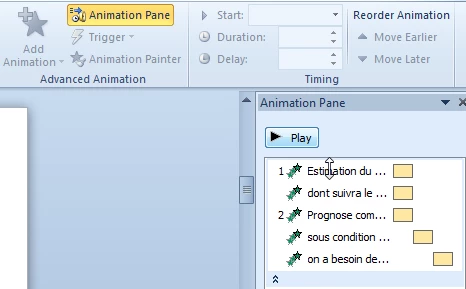
But this must be something in PPT, where you want to advance by mouse click. Captivate will honor that. Check in Advanced animation, Animation pane in PPT, if any object is set to appear at mouse click. The symbols (green) in this screenshot show that there is a click wanted for the object to appear:

Lilybiri

3 replies

Adobe Employee
April 12, 2012

Do you have buttons on that slide?

Can you share the project with us?

Please provide your email address.

Adobe Employee
April 11, 2012

Hi Mathew,

These click boxes are embedded in the slide at the time of creation of the project.

We cannot delete them from this project as they were taken from Microsoft PowerPoint

Please create a new project from Microsoft PowerPoint and in the 'Convert PowerPoint Presentation' dialog box, set Advanced Slide to Automatically.

Hope you will find this helpful.

Participating Frequently
April 11, 2012

I tried this, and I'm coming up with the same result. The presentation pauses at the same places as it did before I created the new one with the adjusted Advance Slide settings.

What else could be causing this? There are no click boxes in this new presentation.

Lilybiri
LilybiriCorrect answer
Legend
April 12, 2012

You should have seen the click boxes if you choose the first option (user advance), I do not know why AdiyaKalania says they are embedded

But this must be something in PPT, where you want to advance by mouse click. Captivate will honor that. Check in Advanced animation, Animation pane in PPT, if any object is set to appear at mouse click. The symbols (green) in this screenshot show that there is a click wanted for the object to appear:

Lilybiri

Lilybiri
Legend
April 11, 2012

Can you post a screenshot of the Timeline of such a slide?

Was PPT set up to have user interaction to move on?

Lilybiri

Participating Frequently
April 11, 2012

As far as I can tell, there were no special interaction settings in Powerpoint. It was provided to me by a SME who made it simply with animations on the text for the various talking points.

Captiv8r
Legend
April 11, 2012

Matthew, can you post a screen capture of PowerPoint? If it's version 2010, click the slide affected and look at the Transitions tab.

Cheers... Rick

Helpful and Handy Links

Captivate Wish Form/Bug Reporting Form

Adobe Certified Captivate Training

SorcerStone Blog

Captivate eBooks