Inspiring
June 7, 2014
Answered

Turn on/off background audio on a slide

  • June 7, 2014
  • 2 replies
  • 503 views

In Captivate 7, it was easy to find a setting to turn on and off background audio for individual slides. Where is that setting in Captivate 8?

    This topic has been closed for replies.
    Correct answer Lilybiri

    Jay,

    The option will appear in the Options tab for the slide, when you insert another audio clip. Bit more limited IMO, because you can play audio also from an advanced action or as an audio object.
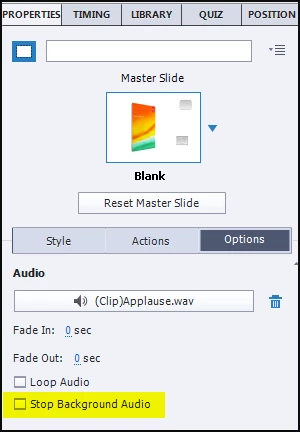
    I will certainly log this as a bug, because in CP7 it was possible to decide if background audio stopped, even if there was no slide audio for that slide.

    2 replies

    Inspiring
    June 8, 2014

    I put in a request.

    I know that Lilybiri does not work directly for Adobe. If she did, they probably would have glued her mouth shut by now. As it is, she expends much energy to help all of us in the Captivate community.

    Lilybiri
    Legend
    June 9, 2014

    Thanks for logging the request, Jay. LOL was seeing myself being glued my mouth... I like the tolerance from Adobe in these forums, refreshing. But you know also that, even though I often tell about what I don't like, I believe that Captivate is a very powerful application and I didn't find one concurrent that has the same capabilities. And that is the reason I try to help as many CP-users as possible, I'm not helping the company Adobe

    Lilybiri
    LilybiriCorrect answer
    Legend
    June 8, 2014

    Jay,

    The option will appear in the Options tab for the slide, when you insert another audio clip. Bit more limited IMO, because you can play audio also from an advanced action or as an audio object.

    I will certainly log this as a bug, because in CP7 it was possible to decide if background audio stopped, even if there was no slide audio for that slide.

    Inspiring
    June 8, 2014

    Lilybiri,

    Thanks for your reply and for logging this in as a bug. I like version 8, but as I explore the new version am finding small things that are more limited or harder to get to or more buried than in the previous version.

    Captiv8r
    Legend
    June 8, 2014

    Hi there

    Hopefully you understand that Lilybiri is not an Adobe employee. She's a user same as most of us here.

    Sure, anyone can log a bug. But it's imperative that EVERYONE that has an issue log a bug using the link below.

    http://www.adobe.com/go/wish

    This is because the more reports of a specific issue, the higher the priority will climb and the more likely we will see a fix issued that addresses it.

    Cheers... Rick