Participating Frequently
November 6, 2014
Answered

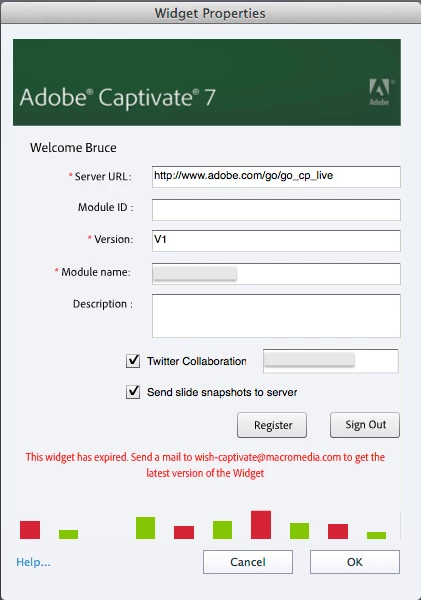
Twitter Widget not working in Captivate 8 (Mac)

  • November 6, 2014
  • 1 reply
  • 718 views

When I add the A3C widget to my lesson, check to add Twitter Collaboration, enter my Twitter handle, and then click Register, I get an error stating the widget has expired. When I follow the directions for sending an email to get the latest version, I receive a bounce back. How can I get the latest version of this widget so it works in Captivate 8 on a Mac?
This topic has been closed for replies.
Correct answer VikramGaur

Hello,

Welcome to Adobe Forums

You may download the latest Widget from here : https://files.acrobat.com/a/preview/de077110-1e10-439c-b256-96b46e584254

Note : Use Insert -> Widget in Adobe Captivate

Thanks,

Vikram Gaur

Adobe Support

1 reply

VikramGaur
Adobe Employee
VikramGaurCorrect answer
Adobe Employee
November 10, 2014

Hello,

Welcome to Adobe Forums

You may download the latest Widget from here : https://files.acrobat.com/a/preview/de077110-1e10-439c-b256-96b46e584254

Note : Use Insert -> Widget in Adobe Captivate

Thanks,

Vikram Gaur

Adobe Support

bsundbergAuthor
Participating Frequently
November 10, 2014

Thanks Vikram! The widget now registers without displaying an error. However, when I published locally, the Twitter widget does not appear in the lesson. As per the Twitter widget help documentation, where can I find the twitterwidget.swf and Twitteroauth.zip files? I think that may be my problem.

VikramGaur
Adobe Employee
Adobe Employee
November 10, 2014

You might need to place the published output on a Web Server or an LMS.

Thanks,

Vikram Gaur