
maseinyerfaceintheplace
Known Participant
May 15, 2019
Question

Typekit font & using variable issue

  • May 15, 2019
  • 13 replies
  • 1273 views

Hello,

I'm using a Typekit font Europa-Regular, which publishes fine.

I've added a variable to the text box.

At runtime, this now displays a slightly heavier weight. I cant work out where Captivate is getting this weight from as Europa-Bold is slightly thicker. It looks like Captivate is applying faux bold.

I have read there are issues with specifying font weights with variables, but here I simply want to use the default, regular weight.

Image 1: Font styling inside Captivate:
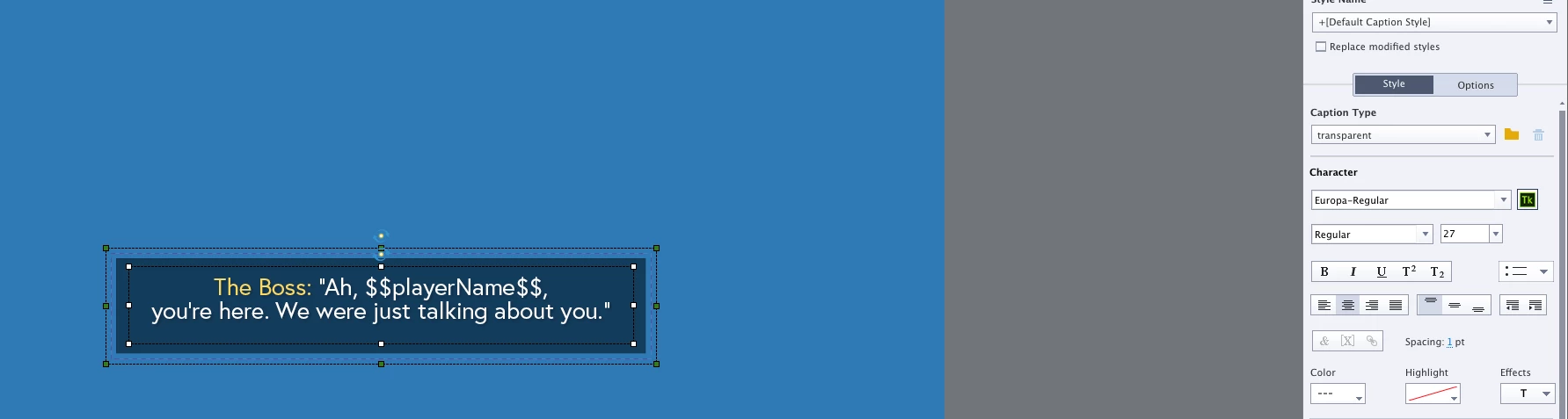
Image 2: Styling applied at run time with variable: (asdadad is username)

Image 3: Normal Captivate styling at run time:

Is this a Captivate / Typekit issue?

A font problem?

Should I not be using Typekit fonts with variables?

Any advice is much appreciated!

Thank you.

    This topic has been closed for replies.

    13 replies

    Inspiring
    May 17, 2019

    @tomaszg42093314  I use Roboto as well - Arial one point size smaller than the Roboto works well for the blocks containing variables.

    Participant
    May 17, 2019

    I have a similar issue with dynamic texts. I use a Roboto font from Typekit, but when I publish the file I see Times New Roman, as if it entirely ignores the Roboto font. Any suggestions?

    Lilybiri
    Legend
    May 17, 2019

    Times New Roman is the default font Captivate is switching to if the used font is not available on the OS and you have text that is rendered on runtime. To avoid that, you need to use either Typekit fonts or websafe fonts. This thread was about Typekit fonts, which is different from your problem. I suspect you did not use the Typekit font Roboto (which exists) or didn't add the domain you published to in the list with domains for Typekit.

    Lilybiri
    Legend
    May 15, 2019

    Wanted to ask if you are creating non-responsive projects? Rod gave already a full explanation why text containers including variables (dynamic text) can look slightly different from those in a static text container which is converted to an image (which means you could use any font).

    I use Typekit fonts all the time, bit bored with the too limited set of websafe fonts. A workaround if the slight differences is bothering ou too much is to force Captivate to render all text containers on runtime. How? Insert an empty user variable in each text container.

    maseinyerfaceintheplace
    Known Participant
    May 15, 2019

    Thanks - Really neat trick with the empty variable! ...but any text containing variables also is really difficult to line up and layout. What I see in the editor is not what I get at run time. I have a black shape behind my text and to try to align blindly just feels like too much.

    Lilybiri
    Legend
    May 15, 2019

    Do you use object styles? I never really have problems with text having variables (I add that empty variable at the end, and set the characters to display at 1. What do you mean by differences on runtime?

    Inspiring
    May 15, 2019

    I always use a standard web font (Arial, for example) for captions that include a variable instead of hoping all will be rendered perfectly on the learner's machine. At least that way the entire block of text will look the same, even if it's slightly different from other text blocks.

    RodWard
    Community Expert
    Community Expert
    May 15, 2019

    I think you will find that if you put two captions side by side on the same slide with exactly the same text, the caption that contains dynamic text pulled from a variable will always look slightly different to the static text.

    The reason for this is that as soon as you add a variable to any part of the caption all of the text in that caption (not just the text supplied by the variable) will be dynamic.  The entire caption text is rendered at run-time. For normal captions containing static text, the caption and text are converted to a PNG image and this is what you see at runtime.

    The only time this changes somewhat is when you are working with a responsive course.  In that case almost all of the text on screen might be rendered rather than being supplied by images because the responsive course needs to dynamically change the size and positioning of the text according to the limitations of the device viewport.

    maseinyerfaceintheplace
    Known Participant
    May 15, 2019

    Thanks.

    I guess, there's no workaround here. Just need to be mindful when planning dynamic text.

    Cheers

    I had no idea that all text gets converted to PNG.

    This might actually save me some time as I have all text as artwork and its quicker to export pngs rather than re-create in captivate. (It's not a responsive project.) ...although doesn't solve my dynamic text issue.