adobe_captivate_tester
Participant
November 9, 2015
解決済み

un erreur fatale s'est produite et l'execution de l'application a pris fin. Adobe Captivate a tente d'enregistrer l'ensemble de votre travail dans les dossiers respectifs du projet en tant que fichiers cpbackup

  • November 9, 2015
  • 返信数 1.
  • 943 ビュー

Hi,

We have Adobe Captivate v. 8.0.0.145 installed Windows 7 x64.

Adobe Activate is crashing with the following error : un erreur fatale s'est produite et l'execution de l'application a pris fin. Adobe Captivate a tente d'enregistrer l'ensemble de votre travail dans les dossiers respectifs du projet en tant que fichiers cpbackup.

I uninstalled Adobe Acptivate, rebooted the PC and re-installed Adobe Activate - error not resolved.

I cleared the cache Under preferences, clear cache - error not resolved.

Please advise.

Kind regards,

George

    このトピックへの返信は締め切られました。
    解決に役立った回答 Lilybiri

    The upgrade should be available from Help, Update. It is available since October 2014.

    Being administrator is not the same as running Captivate as Administrator which has to be set up from the right-click menu on the shortcut that launches Captivate. You have restricted functionality if this is not done.

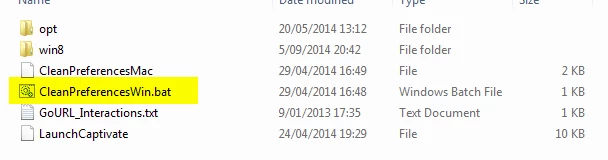
    I told you how to clear the Preferences, with the file in Utils. First close Captivate, when you restart CP a new Preferences folder will be created.

    If you have a lot of customisation you'll lose it when clearing the Preferences. To keep them, have a look at my blog post:

    Captivate 8.0.1 Install? Keep your Customisation! - Captivate blog

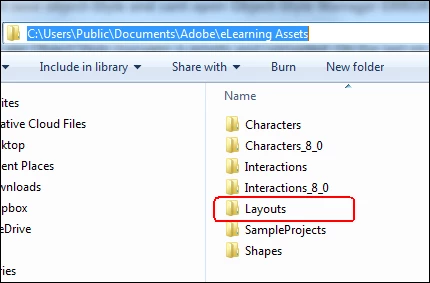
    Layouts folder is in the Public Documents. It is a copy of the original folder in the Gallery. Same with the Interactions.

    返信数 1

    Lilybiri
    Legend
    November 9, 2015

    George, could you install the upgrade that fixed a lot of bugs to get 8.0.1.242?

    When you uninstalled, did you also delete the Preferences and Layouts folders? You can still refresh the Preferences using the clean file in the subfolder 'Utils' of the Captivate installation folder.

    Do you run Captivate as Administrator? Is it installed on your system and are the folders for project files and cache pointing to your system as well? Captivate doesn't like networked drives.

    adobe_captivate_tester
    Participant
    November 9, 2015

    Hi Lilybiri,

    I have not installed the upgrade. Where may I obtain the upgrade please ?

    Kindly point me to the "Preferences and Layouts folders" and I will delete them now ?

    The user is not an administrator though it fails with the same error with my sysadmin account.

    Project files and caching is pointing the local hard drive.

    Kind regards,

    George

    Lilybiri
    Lilybiri解決!
    Legend
    November 9, 2015

    The upgrade should be available from Help, Update. It is available since October 2014.

    Being administrator is not the same as running Captivate as Administrator which has to be set up from the right-click menu on the shortcut that launches Captivate. You have restricted functionality if this is not done.

    I told you how to clear the Preferences, with the file in Utils. First close Captivate, when you restart CP a new Preferences folder will be created.

    If you have a lot of customisation you'll lose it when clearing the Preferences. To keep them, have a look at my blog post:

    Captivate 8.0.1 Install? Keep your Customisation! - Captivate blog

    Layouts folder is in the Public Documents. It is a copy of the original folder in the Gallery. Same with the Interactions.