

Participant
May 24, 2024
Question

Unable to publish file to video

  • May 24, 2024
  • 2 replies
  • 595 views

Hello!

I am trying to export a file to video, but I can't. It only allows me to publish to HTML5. Does anybody what is going on and how to fix this?

I am using Captivate 2019. 
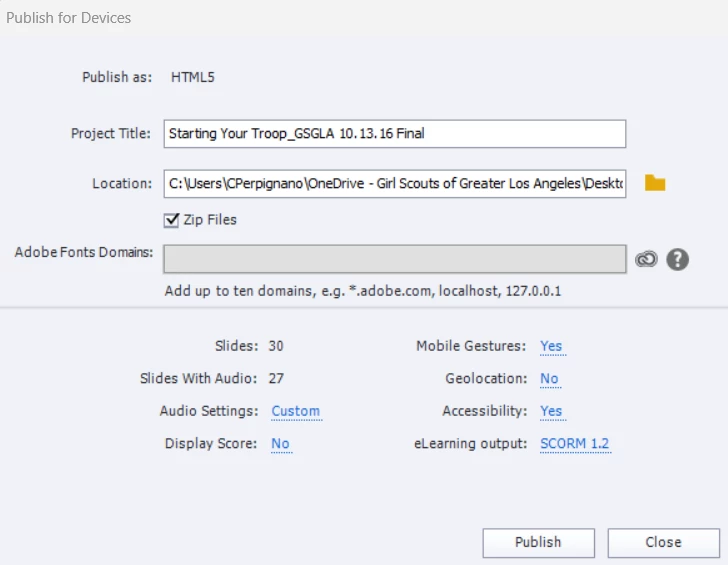
 

Thank you for your help!

 

This topic has been closed for replies.

2 replies

Lilybiri
Legend
May 25, 2024

Under the common name CP2019 three main releases appeared as well as multiple patch releases. Please, always mention the full version number which you can find under Help, About Captivate.

From the screenshot I detect that you want to create a SCO, since parameters for SCORM publishing are available and zipped is automatically checked. That means that you are working with a real interactive project, where you want to transmit data about the interactivities. I that case publishing to a passive video makes no sense.

Be also very careful with using a OneDrive folder to store your files. Especially if you are on the most recent version 11.8.2 or 11.8.3 you are sure to have issues with using synchronisation with a cloud storage.

Only non-responsive projects can be published to video, because too much needs to be rendered on runtime with a responsive project. 

Camila PAuthor
Participant
May 28, 2024

Thank you for the clear explanation! I come from Articulate so a lot of these details I didn't know about. I just wanted to export a video version of the eLearning piece to calculate (roughly) how long the course was. 

I will find another way. Thanks again!


Lilybiri
Legend
May 28, 2024

What do you mean exactly by 'how long the course was'? In a passive setup like a video, that may be a lot shorter than in the interactive setup. The developer's duration is visible in the Table of Contents.

RodWard
Community Expert
Community Expert
May 25, 2024

Is this a responsive project?  That would explain not being able to create a video output.

Camila PAuthor
Participant
May 28, 2024

Thank you!