
Inspiring
December 23, 2015
Answered

Unable to publish to mp4

  • December 23, 2015
  • 1 reply
  • 1510 views

Hello,

I'm having trouble publishing my Captivate 9 project (mac, el capitan) as an mp4.

When I attempt to publish the video, I see the screen below:
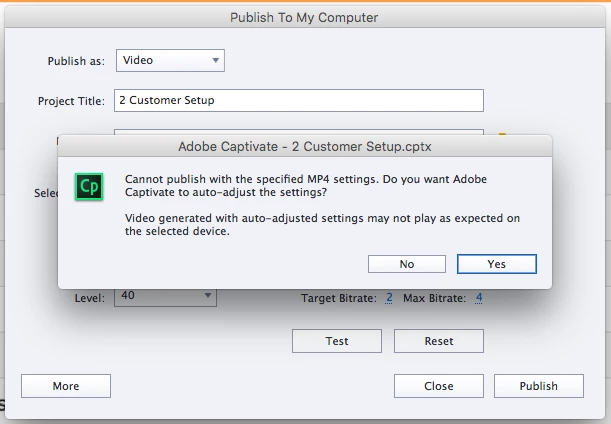
When I click "Yes", none of the settings are adjusted, and the same screen pops up when I try to publish. I just published a similar, larger file (4MB versus 2.4MB) with these exact settings and had no trouble. Additionally, I checked my activity monitor on my mac, and when attempting to publish, 98% of my cpu capacity was idle.


Here are the settings that it is currently attempting to publish at:
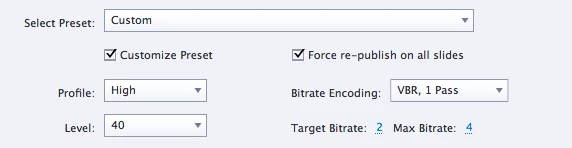
Any suggestions on how to publish this file?

Correct answer rachelp8052132

I tried running the CleanPreferencesMac file, but am still receiving the same message.


Not sure how this worked, but I clicked on "Test", clicked "Yes" to it asking to auto-adjust the settings, and then was able to Publish my files just fine!

1 reply

Participant
December 23, 2015

I had this before. The only thing that worked was to reload.  Save your file so you don't loose it. Then go to:  C:\Users\yourUserName\AppData\Local\Adobe  and change Captivate 9.0 file to old or something else and then reopen Captivate.  If you are saving to documents/My Adobe Captivate Projects it will now be empty.  That's why you need to rename your orig files.

Anyway open Captivate again and open your file, then save as video again.  Should work.  Good luck.

PLEASE this answer has incorrect information, can you  read my answer in the same thread

Lilybiri, moderator.

Inspiring
December 23, 2015

Are these instructions for a mac or pc? I'm not seeing an AppData folder anywhere, and my internet searches are making it seem like that's a windows folder... Or perhaps I need more help beyond the scope of this question.

Lilybiri
Legend
December 23, 2015

Rachel, Run the CleanPreferencesMac file that you find in the Utils subfolder of the Captivate installation folder.

I corrected the answer of iamalexAdobe which is misleading.