m_r88147493
Participant
March 14, 2016
Question

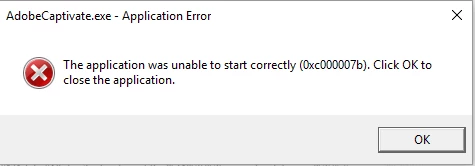
Unable to Start Captivate 9. Application Error

  • March 14, 2016
  • 1 reply
  • 297 views

I have downloaded and installed adobe captivate without any problems. When i start captivate I receive this error. What is the cause.

This topic has been closed for replies.

1 reply

Lilybiri
Legend
March 14, 2016

Was this a first installation of Adobe Captivate? Do you launch it as Administrator if you are on Windows?

m_r88147493
Participant
March 14, 2016

No this was my third attempt. I uninstalled and then reinstalled it. I am on Windows 10. I installed it as administrator.

Lilybiri
Legend
March 14, 2016

When you uninstalled did you also use CleanPreferences from the subfolder 'utils' under the installation folder of Captivate? Maybe also delete the Layouts folder in the Public documents (not under the installation folder of Captivate. ;;

Running as administrator is not the same as installing it as administrator. Right-click on the launch button (wherever it is the way you prefer to launch) and choose Run as administrator