Participant
July 6, 2020
Question

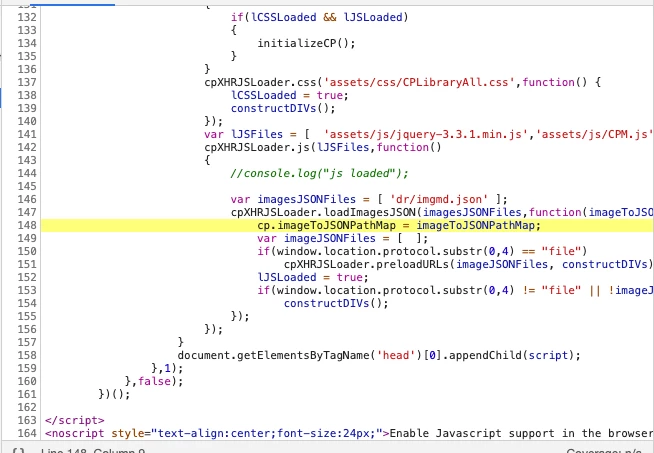
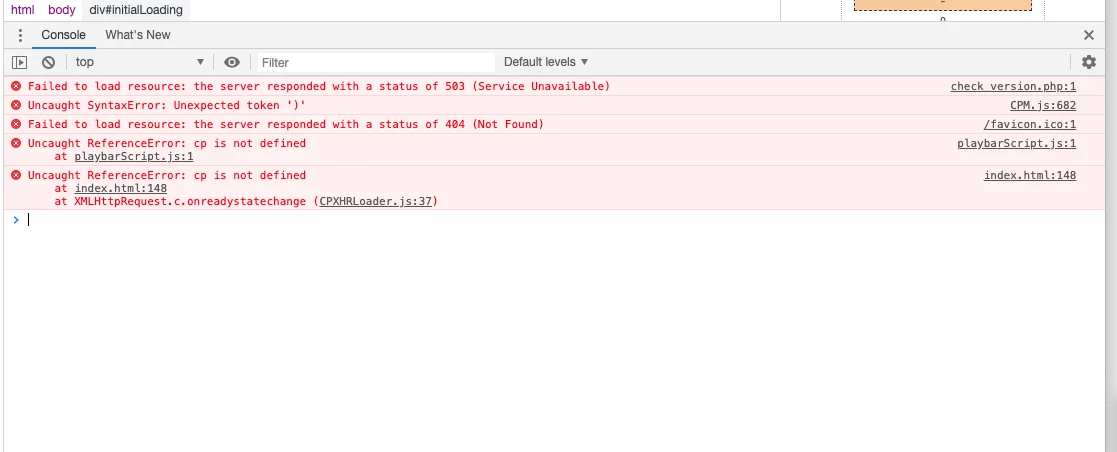
Uncaught ReferenceError: cp is not defined

  • July 6, 2020
  • 5 replies
  • 1847 views

I keep getting this error with a project i am working on using Captivate 11.5.4.613. Other parts of the project are working fine (this projects is 2 modules with 10 lessons each, Most of the lessons work but a few keep coimng up with this error!)


I have done the usual, hide slide, remove the quiz but I

have the error Uncaught ReferenceError: cp is not defined


This project is render without scorm, and exists on its own server.

Link to non working lesson:

http://media.mindinstitute.org/education/ADEPT-1-Chinese/Introduction/index.html

Link to working one:

http://media.mindinstitute.org/education/ADEPT-1-Vietnamese/Introduction/index.html


HELP...This is driving me crazy!


still

    This topic has been closed for replies.

    5 replies

    Participant
    February 22, 2023

    I've had this happen when copying code from a text editor into the Captivate JS dialog.


    It has something to do with line breaks.


    I went through the page where it was happening and rewrote the JS in the captivate JS dialog and this took care of it.

    Lilybiri
    Legend
    February 22, 2023

    Which text editor? Is it a dedicated code editor?

    Participant
    February 22, 2023

    Visual Code Studio

    Participating Frequently
    January 16, 2021

    Hi, 

    I wonder if you have found a solution to the issue.

    We have a similar issue after changing the hosting provider. We have html5 captivate projects that were working on the previous hosting, those projects works locally, but know on the new server we got the same error message Uncaught ReferenceError: cp is not defined.

    We are still looking for a solution to the issue, we think it is more related to the hosting, how it manage cache or specific libraries.


    Any feedback is appreacited.

    Cheers,

    Santiago

    RodWard
    Community Expert
    Community Expert
    January 16, 2021

    Check to make sure your new hosting server is configured to allow JSON files.  Captivate's HTML5 output relies on these JSON files but not all web servers are configured to serve them. This might be your issue.

    Jason Clemens
    Participant
    November 30, 2020

    Do the lessons that are not working have drag and drop?  I discovered I had to rebuild my drag and drop slides.  Now my circumstance maybe a little different.  I had a course originally built in Captivate 6, then updated in 9, then 2017, and now 2019 and problems insued.  I just rebuilt the drag and drop slides I had and it now works.  Latest Captivate version that I have is: 11.5.5.553

    kdmemory
    Inspiring
    July 7, 2020

    Hi PHUGUNIN,

    with this kind of problem it is best to follow the trace from the very start. The first error message is:

    Failed to load resource: the server responds with a status of 503 (Service unavailable) ... check_version.php:1

    What is check_version.php? Is it a Browser sniffing routine? I'm not aware that Captivate incorperates PHP, at least I've never heard of it. Is it something you added somewhere or is it a PHP routine on your own server and is automatically included in requests to the server? The HTTP status 503 very likely means that the server is overwhelmed by too many synchronous requests.

    My guess is that every error that follows is a consequence of this very first resource loading problem. It might be a good idea, to check your output on a different server or on a locally installed server. To see whether the same happens there.

    Klaus

    PHUGUNINAuthor
    Participant
    July 7, 2020

    It happens on the working version also... but they function...

    Stagprime2687219
    Legend
    July 6, 2020

    Did you make any changes at all to that  index.html file?

    Errors in that code can cause a hang like you are experiencing.

    PHUGUNINAuthor
    Participant
    July 6, 2020

    No I did not