
"undefined" survey answers in Moodle interaction report
Hello,
I am using Captivate 8.0.2.266 on a Mac to create a survey with 24 MCQs + a final text field for comments. I just used the regular MCQ tool with quiz properties set to "survey" with "multiple answers". The HTML5 SCORM package is uploaded to Moodle. I have two questions on each slide, each question has 5 checkboxes (Likert scale from SD-strongly disagree to SA-strongly agree) [and yes, I know there are better tools for surveys, but there are good reasons why I am using Captivate]. So in total there are 10 buttons on each slide. All checkbox are marked as "correct", and all slides/questions have the "report answers" checkbox selected.
When I try taking the survey in Moodle, everything seems to work fine, but when I access the 'interaction report', some of the answers - but not all (always the second one on a slide, but not for each slide) are given as "undefined" :
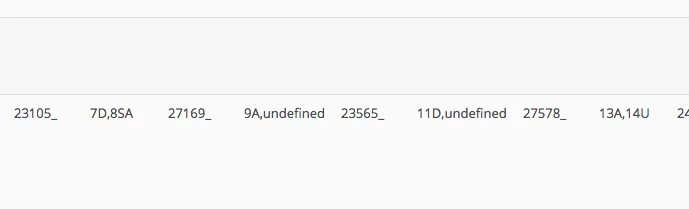
Any idea why this might be happening? It has been driving me crazy and I cannot work out what is causing it.
I should add that I have entered text next to each checkbox to be able to quickly identify each response. However, I don't want the text to be visible to users, so I have a few blank spaces (spacebar) before the text, and then I have made the text box 'too small' so the text is not displayed. For example, question 1 has 5 checkboxes: 1SD, 1D, 1U, 1A, 1SD, but users cannot see this text (see image below of the "before" resizing the box to make the text "invisible").
I actually tried with 3 questions on each slide initially, then because I was getting "undefined" for most 3rd questions, I thought the problem might have something to do with being at the end of the string. This is why I tried changing to only two questions on each slide, which did make things better, but a few answers are still showing as "undefined". I also tried removing spaces from the checkbox properties but it didn't seem to solve the issue. Also, question 1 (i.e. the first 5 checkboxes) on each slide is working fine with spaces - no "undefined" there.

Thank you in advance to anyone who can point me in the right direction!
 AdChoices