Inspiring
June 5, 2018
Answered

Unwanted Gesture Navigation in Browser Window

  • June 5, 2018
  • 2 replies
  • 1595 views

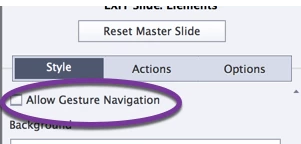
I de-selected "Allow Gesture Navigation" in my non-responsive course. 

However Gesture Navigation appears in my browser window when previewing in browser and upon publish. 

I do not want it to appear.   Any ideas??
This topic has been closed for replies.
Correct answer Lilybiri

I know, you should log it as a bug.

Can proose a workaround, similar to the one I described in Poster Image - AutoPlay - Captivate blog

Find the icons used for gesture in the instellationsfolder\HTML\Assets\HTMLImages and replace by an empty png.

2 replies

Inspiring
June 5, 2018

Thanks.  Logged it as a bug.

For Mac users, the path is Applications\Adobe Captivate 2017\HTML\assets\htmlimages\

There are several icons:

gesturemobileicon.png

gesturemobileicon@2X.png

gesturemobileicon2.png

gesturemobileiconlandscape.png

gesturetabletimage.png

I modified the 1st 2.

Mudshark_Baby
Participant
June 19, 2020

Possibly too old a post, but I was looking at this too now I am on Captivate 2019, as the gesture functionality didn't seem to work for us in Captivate 9 so we didnt know we would want to remove it.


click Window > Mobile Palette and check the box next to Gesture Configuration


This removes the Gesture config for the whole project instead of just the one slide which you were selecting.  When I was looking at the support replies on here for gestures, I thought crikey, we have to remove the tickbox off each slide?!


Thanks goodness another post mentioned the solution above.


All our eLearning is System Simulation so there is no way people would be able to do our courses on a phone or tablet, as the PC products we use are just too small to read on them.

Known Participant
August 26, 2020

Thank you so much for this. I updated a quiz and removed SWF and only published to HTML5 and the gesture icon displayed. It didn't when I published it originally (also Captivate 2019). I had deselected all of the Allow Gesture Navigation checkboxes as well. Used your instructions and it's gone 🙂

Lilybiri
LilybiriCorrect answer
Legend
June 5, 2018

I know, you should log it as a bug.

Can proose a workaround, similar to the one I described in Poster Image - AutoPlay - Captivate blog

Find the icons used for gesture in the instellationsfolder\HTML\Assets\HTMLImages and replace by an empty png.