
adobe5505
Known Participant
October 16, 2015
Answered

user defined variables not displaying properly

  • October 16, 2015
  • 1 reply
  • 622 views

Hello, I am using user defined variables in Adobe Captivate 9. I am having users enter text in a text entry box, then displaying their entry on another slide. When I test out the project the user defined variable only partially displays what I have typed into the text entry box. Anyone have any solutions???
This topic has been closed for replies.
Correct answer Captiv8r

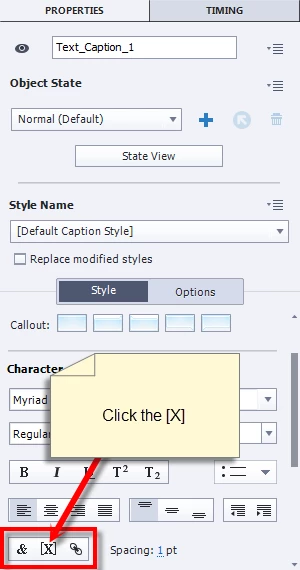
You have to do it via the properties panel.

Cheers... Rick

1 reply

Captiv8r
Legend
October 16, 2015

Hi there

How many characters are being presented?

When you choose to insert a variable into something like a Text Caption, you are presented with a dialog that allows you to specify the number of characters to present.

As you can see, the default is 50, but you can change it.

Additionally, if you size the caption too small, it could also cause truncation.

Cheers... Rick

adobe5505
adobe5505Author
Known Participant
October 16, 2015

Hi Rick,

Thank you so much for your prompt response!

I have adjusted the maximum length on the text entry box itself but not on the variable. I have been inserting the variables using the $$ method. I can't seem to locate where to physically insert the variable to where I will get the box allowing me to adjust the length of the variable itself. Any ideas?

Captiv8r
Captiv8rCorrect answer
Legend
October 16, 2015

You have to do it via the properties panel.

Cheers... Rick