Participant
January 24, 2014
Answered

using advanced actions to make a button appear at the end of my project - HELP

  • January 24, 2014
  • 2 replies
  • 1026 views

I am working building a set of advanced actions that allow a user to show buttons at the end of the test based on their Text Entry Box answers. The plan i have worked out so far is:

1. on the slide after the TEB, I have a Conditional action that uses IF cpQuizInfoLastSlidePointScored = 1 THEN assign Variable 1 with 1 (the variable is set to 0)

2. at the end of the test, I have an advance action that says IF variable =1 THEN Hide button (the button says they did the action wrong so hiding it meant they did that entry correct) ELSE Show Button

I have a total of 23 of these TEB interactions

Everything works perfectly if every answer is correct

Everything works perfectly if every answer is wrong

The problem arrises when only one or some of the answers are wrong. when that happens, no buttons show up.

I built a debugging slide and am positive every Variable I built is receiving the first interaction.

so, what could I have done wrong on my process? Any help would be appreciated.

This topic has been closed for replies.
Correct answer RodWard

First. thank you both for your respine and help in this matter. Here are screenshots of exactly what i built.

after every TEB slide i have this at entry of the next slide
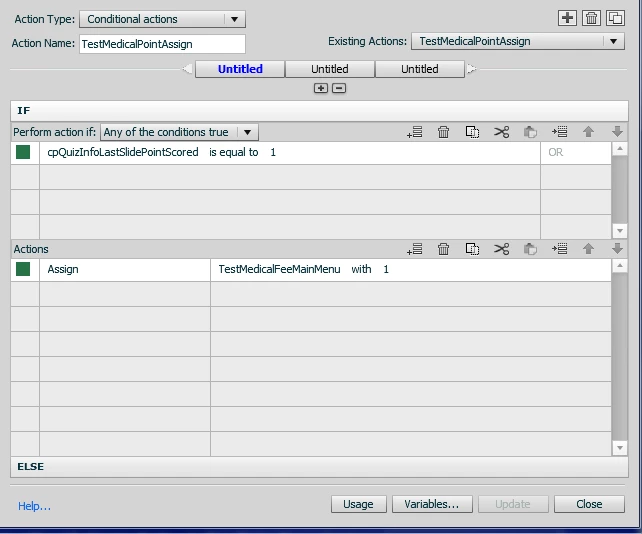
at the end of the process i am testing them on i have a blank slide (running for .2 seconds) with this
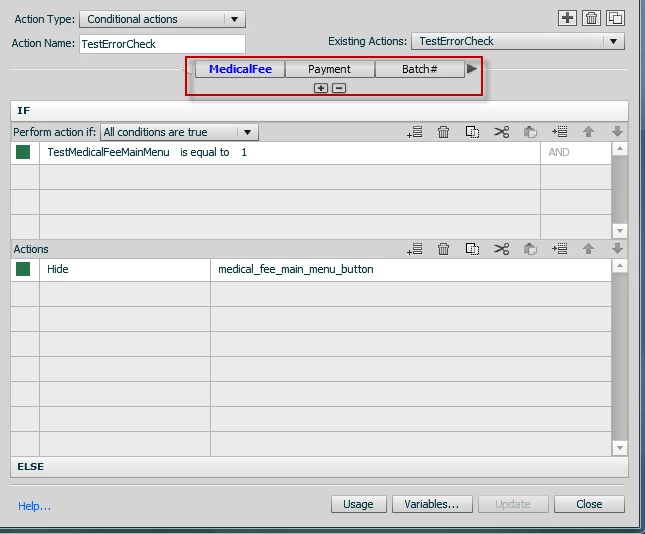
I have each test point check in a seperate block. if the answer is correct, then hide the button, if incorrect show the button

Also i am running Captivate 6.0.1.240

Thank you for taking the time to look at this and hopefully getting my issue resolved before i go bald.

(P.S. Rod- I bought your book trying to fix this before i came to the forums and you taught me how to build my debugging slide. thank you for that)


Always nice to hear about someone that likes my book.

One thing you haven't made clear to me yet.  You say that you execute the first action 'at entry of the next slide'. I'm assuming that you mean by using the ON Enter Slide event of the slide following the quiz question slide?

Then you mention that 'at the end of the process' you have a blank slide that executes the final conditional action.  I'm assuming again that you mean you use the ON Enter Slide event for the Quiz Results slide where your buttons are to show up?  You won't be able to execute SHOW/HIDE actions for objects on slides other than the one where the action is executed.

My personal preference for setting the variables on each quiz slide would be to use the On Success event of the quiz slide just to set the variable directly rather than using a conditional action decision block as you have done. If your quiz questions are all set to one point for success, then just using the ON Success action should have the same result, but it's just more direct, and therefore less prone to any issue (e.g. if for some reason the cpQuizInfo system variable didn't work, your On Success event should still have fired). 

In theory, your way (using the system variable) should work too, but sometimes if there is more than one way to do something, and your current way isn't working, the trying the other way can get you out of trouble.

I'm assuming that your final conditional action has an ELSE action for each decision block that SHOWS the button?

One thing also that Lilybiri would probably suggest is that you try renaming all of your decision blocks in this last conditional action.  It could be that one of the names of your decision blocks is causing some kind of conflict.  I notice that you have one decision block name with a hash punctuation character.  Not a good idea.

2 replies

RodWard
Community Expert
Community Expert
January 25, 2014

You should have a conditional action on the Quiz Results slide with separate Decision Blocks to evaluates each of these variables.  Each decision block will check the value of the variable that is tracking a given question and if that varialble is set to 1 then show the relevant button on the quiz results slide.  You cannot do this interaction with a single standard action, or a conditional action that has less than one decision block per question variable.

Lilybiri
Legend
January 25, 2014

Am I totally stupid? How do you understand what he wants? Is he having between 0 and 23 buttons on that last slide?

RodWard
Community Expert
Community Expert
January 25, 2014

My understanding is that Pawjtr has 23 TEB interactions, each of which sets a different user variable to 1 if correct or leaves it at 0 if incorrect.

At the end of the test he has one advanced action that is supposed to show or hide buttons.  He doesn't mention what type of advanced action it is, but the only way he'll be able to show individual results for each TEB interaction is to use a conditional action.  The only way to show or hide each button on the results slide according to the value of its relevant user variable is to have a separate decision block in the conditional action for each variable.

If I'm misunderstanding Pawjtr's explanation, then I humbly apologise.

Lilybiri
Legend
January 25, 2014

Hello and welcome to the forum,

Want to see the advanced action. Are you serious that you have 23 variables to check?  You are on Captivate 6, which exact version number please? There were 3 versions of 6.

And can you explain in plain English what has to happen:

  • when all TEB's had a correct value
  • when none of the TEB's had a correct value
  • when some of the TEB's had a correct value?

Probably could offer some tips for an easier work flow.

Lilybiri