
Using Google Analytics to track usage and exit points in CP projects
Guys,
I have been trying to get google analytics (GA) to report usage of my HTML5 courses. I am wondering if anyone can help me make this solution a bit more elegant..
We install GA by adding a bit of javascript to the header of each page. Because CP HTML5 projects only have one page, this should just be a case of adding the GA code snippet into the header of the index.html file. This however does not work. I believe that this is because the API hasn’t loaded at the point that the code is executed, so can’t reference the CP variables that I need to build a pseudo-URL (see code below).
The good news is that I do have CP and GA integrated. The bad news is that I have had to add the code snippet to an On Enter event on each slide. Repeating code is terribly bad practice (and limiting), but it does work.
What I would really like to know is if there is a solution where I can put the GA code in one place (e.g. index.html) and for the thing to work. I have seen a forum post where CP was successfully integrated to Google Sheets, so I am guessing that it is possible, but I can’t make the leap from that post to something that works for me. If you have any thoughts in that direction, they would be greatly appreciated.
Below is the code that works. And the code that doesn’t work.
Thanks in advance
Simon
Working! Adding GA to On Enter event
The following code is added as Execute Javascript action (current window)
//start code
(function(i,s,o,g,r,a,m){i['GoogleAnalyticsObject']=r;i
(i
m=s.getElementsByTagName(o)[0];a.async=1;a.src=g;m.parentNode.insertBefore(a,m)
})(window,document,'script','https://www.google-analytics.com/analytics.js','ga');
// if you want to try this at home you’ll need a GA ID which you’ll get when you register for the service
ga('create', 'UA-your GA ID', 'yourdomain.com');
// Because there aren’t actual any physical pages in a CP HTML5 project, a pseudo page is constructed from the Project and Slide Names
var myPage = '/' + window.cpAPIInterface.getVariableValue("cpInfoProjectName") + '/' + window.cpAPIInterface.getVariableValue("cpInfoCurrentSlideLabel") ;
var myTitle = window.cpAPIInterface.getVariableValue("cpInfoCurrentSlideLabel") ;
ga('set', {
page: myPage,
title: myTitle
});
ga('send', 'pageview') ;
//end code
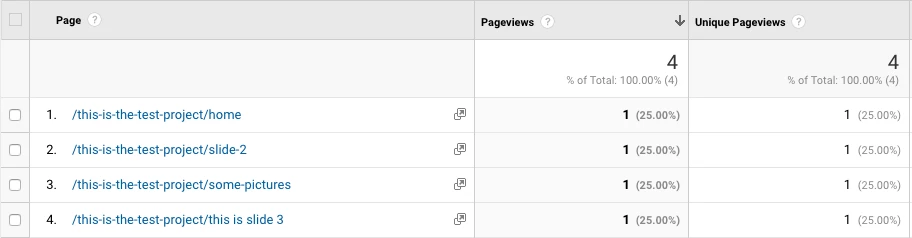
Bingo! (GA report below)
Not working
Here’s the code that I hacked together after reading various blog and forum posts, but to no avail. I added it into the index.html header but can’t get it to work.. The GA debugger gives no clues. It just fails silently. But given that the On Enter event method works, my suspicion is that this is a timing issue – the code is running too soon in the initialisation cycle. But that’s just my guess…
<script>
(function(i,s,o,g,r,a,m){i['GoogleAnalyticsObject']=r;i
(i
m=s.getElementsByTagName(o)[0];a.async=1;a.src=g;m.parentNode.insertBefore(a,m)
})(window,document,'script','https://www.google-analytics.com/analytics.js','ga');
var interfaceObj;
var eventEmitterObj;
window.addEventListener("moduleReadyEvent", function(evt)
{
//evt.Data carries the interface object.
//It is same as window.cpAPIInterface
interfaceObj = evt.Data;
eventEmitterObj = interfaceObj.getEventEmitter();
});
//check if window.cpAPIInterface is available
if(interfaceObj)
{
//check if window.cpAPIEventEmitter is available
if(eventEmitterObj)
{
var myPage = '/' + interfaceObj.getVariableValue("cpInfoProjectName") + '/' + interfaceObj.getVariableValue("cpInfoCurrentSlideLabel") ;
var myTitle = interfaceObj.getVariableValue("cpInfoCurrentSlideLabel") ;
ga('create', 'UA-your GA ID', 'yourdomain.com');
ga('set', {
page: myPage,
title: myTitle
});
ga('send', 'pageview') ;
}
};
</script>


 AdChoices