

jmack50
Participating Frequently
April 28, 2016
Answered

Using multi-state objects for next step in Cap 9

  • April 28, 2016
  • 1 reply
  • 577 views

In my old clunky eLearning authoring tool, I could create a slide with multiple steps. You would click the Next Step button to display text and graphic.  When you get to the last step, the Next Step button disappears, so you know you're done. How can I make this work with multi-state objects in Cap 9?  I created a multi-state object with 3 states. I created a button with an action of Go to Next State.  That's fine until you get to the last state.  If you click the button again, it starts over with the first state.

Yes, I can create multiple buttons. But I really just want to have one button called Next Step that disappears after you display the last state.  The user would know she had displayed all the steps.

Any suggestions are welcome.  Thanks. 

Jeanne M
This topic has been closed for replies.
Correct answer Lilybiri

Sounds great!


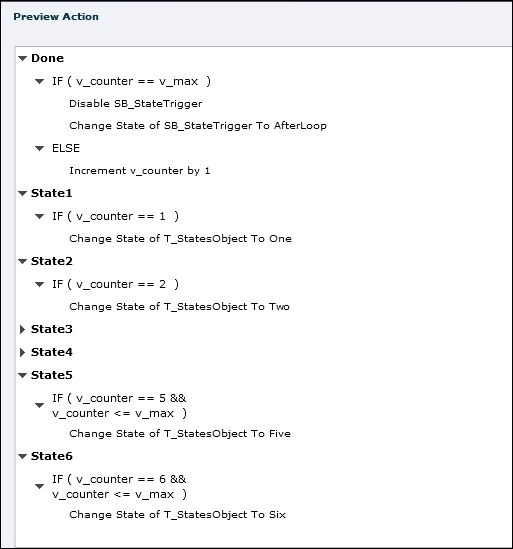
Here is a script example:

This was set up for 6 states (for a text container, the Normal state was an empty shape).

There are 2 user variables:

  • v_counter has a default value of 0
  • v_max is the number of states, you can replace it by the literal '6' or what you need

The first decision "Done" checks if the counter has reached the maximum value (v_max). If that is the case all states have been shown and it should end the loop. That is why that decision will disable the button used to change states (SB_StateTrigger) and here also change its state to an invisible state (AfterLoop). When returning to the slide, the state will again be Normal (visible), and you only have to enable the button again. You can replace this by a single Hide action as well if you want.

If the first decision is not true, there are still states to be shown and the counter is incremented.

The other 6 decisions are all similar (I collapsed 2 of them): they will test the value of the counter and show the associated state. From state3 on I used a combinated criterion. That makes it possible to use exactly the same advanced action also if the total number of states is lower than 6. You only have to change the value of v_max.

1 reply

RodWard
Community Expert
Community Expert
April 29, 2016

Why not just hide the button after the last step?

Lilybiri
Legend
April 29, 2016

??? How would you do that, Rod? OP wants only to use the simple action 'Go to Next State' triggered by that button. Indeed, it will loop through the states, and once you reach the last state, it will restart from the first state.

It would be a nice feature to add, but don't know if it is possible. My 'cheating' is to add a blank state as last state, and hope that the user will not continue to click the button.

Other approach is of course not to use the simple action, but a conditional action. Since there is no looping possible, and the action 'Go to Next State' is not available in the Advanced Actions dialog box, it will be more complicated because you'll have to use a counter and a decision for each state. It is then possible to disable or hide the Next button within the last decision. I understand that this seems to be rather complicated for what is thought to be a simple looping.

RodWard
Community Expert
Community Expert
April 29, 2016

I know that's what he wants to do but I don't see the point of trying to use the Change State action when it seems much simpler to me to HIDE the entire button once you reach the last state.